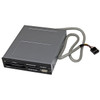
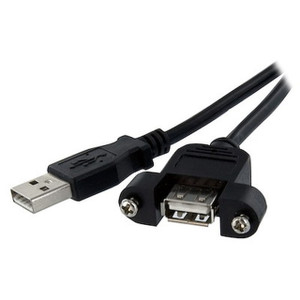
StarTech 35FCREADBK3 Internal 3.5" 7-Slot Multi-Card Reader
Overview
The StarTech 35FCREADBK3 is an internal 3.5-inch front-panel card reader that brings access to 22 different flash memory card formats directly to your desktop's front bay. Designed for IT workstations, media production systems, and engineering stations where frequent card transfers are routine, it eliminates the tangle of external USB dongles by mounting flush into a standard 3.5-inch drive bay and wiring directly to the motherboard's internal 9-pin USB header. The result is a clean, always-available card interface that doesn't consume a rear USB port or sit on a desk waiting to get knocked off.
With simultaneous access across different card types and a front-mounted USB 2.0 Type-A pass-through port, the 35FCREADBK3 does double duty as both a card reader and a front-panel USB expansion point — a practical combination for systems where front access matters.
Key Features
- 7 Card Slots, 22 Supported Formats: Seven physical slots cover an unusually wide range of flash memory standards — SD, SDHC, SDXC, microSD, CompactFlash, Memory Stick, xD, and more. This breadth means a single installed reader handles virtually any card a colleague, camera, or field device brings to the workstation, avoiding the need for format-specific adapters.
- 3.5-Inch Internal Form Factor: Installs into the standard 3.5-inch front bay found on most mid-tower and full-tower desktop cases. At 5.1 x 4.1 x 1.0 inches and 7.4 oz, it fits the bay without modification and presents a flush, professional front panel rather than a protruding peripheral.
- USB 2.0 Interface via 9-Pin IDC Connector: Connects to the motherboard's internal 9-pin USB 2.0 header — the same header used by case front-panel USB ports. No drivers typically required on modern operating systems; the reader enumerates as a standard USB mass storage device. USB 2.0 throughput is sufficient for card formats up to the rated 256GB capacity, though sustained large-file transfers on fast SDXC or CFexpress alternatives will be constrained by the USB 2.0 ceiling.
- Simultaneous Multi-Card Access: Different card types can be accessed at the same time, which matters when you're transferring files from multiple sources in one session. The one constraint to know: two cards of the same media type cannot be accessed simultaneously, so back-to-back copies between two SD cards, for example, require sequential handling.
- Front-Panel USB 2.0 Type-A Port: The single front-facing USB 2.0 Type-A port provides a convenient connection point for USB drives, peripherals, or charging — without requiring a second internal header connection. Systems with limited front-panel USB access benefit directly from this addition.
- USB-Powered at 5V DC: Draws power entirely from the USB bus — no dedicated power cable from the PSU required. This simplifies installation in cases where power connectors are already fully allocated, and means the reader adds zero load to the 12V or 5V Molex rails.
- 256GB Max Drive Capacity: Supports media up to 256GB per slot. This covers the majority of current SD and flash card capacities in professional camera and field equipment deployments, though emerging 512GB+ SDXC cards will not be fully recognized.
- Single Power/Activity LED Indicator: A single LED on the front panel signals power status and card activity. Subtle but functional — tells you at a glance whether a transfer is still in progress before you pull a card.
- Steel and Plastic Construction: The chassis combines a steel mounting frame with a plastic face panel, giving it enough rigidity to install cleanly and survive repeated card insertions without flexing in the bay.
- TAA Compliant: Meets Trade Agreements Act requirements, making the 35FCREADBK3 eligible for U.S. federal, state, and local government procurement contracts where TAA compliance is mandated.
- Operating Temperature 0°C to 70°C: Rated for standard indoor operating environments. Not designed for uncontrolled temperature environments — keep this in mind for any deployment in industrial enclosures or non-climate-controlled server rooms.
Integration and Compatibility
The 35FCREADBK3 connects to any desktop motherboard with an available internal 9-pin USB 2.0 header — a near-universal feature on ATX, Micro-ATX, and Mini-ITX boards from the past decade. Most modern operating systems (Windows, macOS with external enclosures that expose the header, Linux) recognize the reader as a standard USB mass storage device without additional drivers. The front USB 2.0 Type-A port is also driven off the same internal header, so both functions share a single header connection. Verify your motherboard has an unallocated 9-pin USB 2.0 header before ordering — systems with all headers occupied by the existing front panel I/O will require a USB header splitter or will not be compatible without one. For systems managing network-attached storage or frequent media ingest workflows, pairing this reader with a well-organized file transfer station reduces card turnaround time compared to ad-hoc USB dongles.
Frequently Asked Questions
Q: How many card slots does the StarTech 35FCREADBK3 have, and can I use multiple cards at the same time?
A: The 35FCREADBK3 has 7 card slots supporting 22 flash memory card types. You can access multiple cards simultaneously, provided they are different card types. Two cards of the same media type cannot be accessed at the same time.
Q: What is the maximum card capacity supported by the 35FCREADBK3?
A: The 35FCREADBK3 supports flash memory cards up to 256GB per slot. Cards larger than 256GB are not guaranteed to be recognized.
Q: Does the 35FCREADBK3 require a separate power connector from the power supply?
A: No. The 35FCREADBK3 is USB-powered at 5V DC, drawing all required power from the motherboard's internal USB header. No Molex or SATA power cable from the PSU is needed.
Q: Is the StarTech 35FCREADBK3 TAA compliant?
A: Yes. The 35FCREADBK3 carries TAA (Trade Agreements Act) compliance, making it eligible for U.S. government and federal procurement contracts that require TAA-compliant products.
Q: What is the warranty on the 35FCREADBK3?
A: The 35FCREADBK3 includes a 2-year manufacturer warranty.
Q: What internal connector does the 35FCREADBK3 use, and will it fit my motherboard?
A: The 35FCREADBK3 uses a standard 9-pin IDC internal USB 2.0 header connector, found on virtually all modern ATX, Micro-ATX, and Mini-ITX desktop motherboards. Confirm you have an unoccupied 9-pin USB 2.0 header on your board before installing.
The 35FCREADBK3 is the kind of low-drama install that earns its keep over years of daily use. What I appreciate about the spec here is the 9-pin IDC internal connection — it means the card reader and the front USB-A port both run off a single motherboard header, keeping the internal cabling clean and leaving your rear USB ports fully available for other peripherals. At 7.4 oz installed into the 3.5-inch bay, it sits rock-solid and doesn't rattle on card insertion.
Technical Highlights:
- 22-Format Coverage: Seven slots across 22 card types means this single bay install handles essentially any flash media your team brings in — from legacy CompactFlash used in older DSLR and security cameras to current microSD from body-worn devices, all in one fixed front-panel location.
- USB Bus-Powered at 5V DC: Zero PSU connections required. In a workstation where every Molex connector is already spoken for, this matters. The reader pulls what it needs from the USB header — no cable management headaches.
- TAA Compliance: For government integrators or enterprise buyers on GSA schedules, TAA compliance on the 35FCREADBK3 means you can spec this into a procurement without triggering a compliance exception review.
Deployment Considerations:
- Verify your motherboard has an unoccupied 9-pin USB 2.0 internal header before ordering — if your case front panel already uses both headers, you'll need a header splitter to free one up. This is the most common installation snag.
- USB 2.0 throughput will be the bottleneck on large SDXC transfers. For workflows moving 64GB+ card dumps regularly, factor in transfer time — this is not a USB 3.0 reader, and that's a real constraint at high card capacities.
This is a solid fit for IT asset workstations, forensic evidence intake stations, or any government desktop build where front-panel card access to 22 formats and TAA compliance both need to land in a single 3.5-inch bay without consuming rear ports or adding desktop clutter.