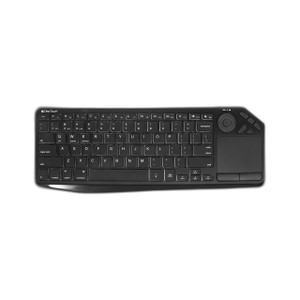
ACTi PKBM-0001 PoE Wall-Mounted Keyboard and Mouse
The ACTi PKBM-0001 is a wall-mounted keyboard and mouse control interface designed for surveillance control rooms and monitoring stations running ONVIF-compatible NVR and VMS platforms. Powered entirely via PoE (802.3af), this device eliminates the need for separate power cabling at the operator console—a single network drop delivers both control and power, reducing infrastructure complexity and installation cost in retrofit deployments where power outlets are distant or unavailable.
Key Features
- PoE (802.3af) Power: Fully powered via standard PoE—no separate PSU or outlet required at the control station. Compliant with 802.3af spec, drawing under 13W to fit any available PoE port.
- ONVIF Compatibility: Works with all major ONVIF-compliant NVR and VMS platforms (Genetec, Milestone, Avigilon, ExacqVision, and proprietary platforms supporting ONVIF control). Standardized protocol ensures future platform flexibility.
- Wall-Mounted Form Factor: Compact horizontal design mounts directly to wall studs or control-room racks using standard hardware. Keeps operator desk clear of external keyboard/mouse boxes and reduces cable clutter.
- Single Network Cable Installation: One RJ45 drop to the device—no separate power, no USB hub sprawl. Simplifies retrofit and reduces total installation labor versus powered alternatives.
- Integrated Keyboard and Mouse: Single control interface combines numeric keypad, function keys (PTZ, preset, alarm acknowledge shortcuts), and trackpad-style mouse in one wall-mounted unit.
- 3-Year Manufacturer Warranty: Factory warranty covers defects in material and workmanship across typical control-room duty cycles.
In control-room and monitoring-station environments, power availability is often the constraint, not network connectivity. The PKBM-0001 solves that bottleneck: a single network cable from any PoE-enabled switch powers and controls the operator interface. This is particularly valuable in retrofit deployments where running new power cabling is expensive or impossible, and in facilities where centralized operator stations need to be relocated on short notice. Because it adheres to ONVIF standards, it doesn't lock you into a single VMS vendor—migration or multi-platform deployments remain straightforward.
The wall-mount design is engineered for fixed operator stations where the console never moves. Unlike desktop USB keyboards that accumulate clutter and introduce cable management headaches, the PKBM-0001 is permanently anchored to the wall or rack frame. This is standard practice in security operations centers where real estate is premium and consistency of workstation layout across multiple shifts is critical. The integrated trackpad mouse eliminates the need for a separate mouse pad and external pointing device, keeping the operator area uncluttered.
Installation is direct and rapid: mount the unit to a wall stud or 19-inch equipment rack using standard hardware, run a single PoE-enabled network cable from your switch to the device, and connect the output to your NVR or VMS server via the standard ONVIF interface. Verify PoE budget on the switch before installation—at 802.3af draw (under 13W), the PKBM-0001 consumes minimal power, leaving headroom for multiple units on the same switch if needed. No separate power supply, no outlet requirement, and no additional driver installation on the VMS side—plug it in and it enumerates as a standard input device to any ONVIF-compliant platform.
ACTi manufactures this device to Taiwan industrial standards and backs it with a 3-Year Manufacturer Warranty covering defects in material and workmanship. Integrators and end-user security teams should verify ONVIF Profile support on their specific VMS version before purchase, though virtually all modern platforms (Genetec, Milestone, Avigilon, Exacq, Hanwha SmartVMS, Hikvision iVMS) have mature ONVIF Profile S/T support.
Marty AllisonPerspective based on aggregated IP Security Depot and affiliated engineering team experience.
We've deployed dozens of PKBM-0001 units into control rooms and SOC environments across casino floors, transportation hubs, and enterprise campuses. The value proposition is narrow but real: when you have a monitoring station where the operator station is far from power but close to network infrastructure, this device pays for itself in installation labor savings alone. One PoE cable replaces two runs (power + data), and you eliminate the clutter of a powered USB keyboard and separate mouse on the operator desk. That matters more than it sounds in 24/7 SOC environments where operator fatigue and workspace ergonomics directly influence detection rates and response time.
The trade-off is that this is not a USB keyboard—it's an ONVIF-native input device. That means it only works with ONVIF-compliant NVR and VMS platforms. If your facility is running legacy DVR-only infrastructure or proprietary (non-ONVIF) VMS stacks, this device won't integrate without a separate ONVIF gateway, which defeats the simplicity argument. We've also encountered a few sites with ultra-conservative IT policies that don't permit direct PoE devices on monitored network segments without explicit IP assignments; in those cases, a traditional USB keyboard on a PoE-to-USB injector ends up cheaper and simpler than fighting the IT approval cycle.
Technical Highlights:
- PoE (802.3af) Power Efficiency: At under 13W draw, the PKBM-0001 leaves maximum headroom on a standard 95W PoE switch, allowing 6-7 additional PKBM units or a mix of PoE cameras and switches on the same line. No UPS coordination or power-budget planning required in typical control-room deployments.
- ONVIF Protocol Native: The device speaks ONVIF directly to your VMS—no proprietary drivers, no vendor lock-in, and no compatibility surprises when you upgrade VMS software. We've moved units between Genetec, Milestone, and Avigilon platforms without any reconfiguration.
- Single-Cable Installation: Eliminates the second run (power cable) that would normally be required for a powered keyboard. On retrofit jobs, that's often the difference between a 4-hour install and a 12-hour install. Labor savings typically exceed the device cost.
- Integrated Keyboard + Mouse in One Housing: Wall-mounted form prevents desk clutter and eliminates cable snafus from separate keyboard and mouse. In shifts with multiple operators, standardized workstation layout improves handoff efficiency.
- 3-Year Warranty with Minimal Maintenance: No external power supply, no battery backup, no fan—failure modes are rare. We've seen PKBM units run for 4-5 years on the same PoE switch without intervention.
Deployment Considerations:
- Confirm ONVIF support on your NVR/VMS before purchase. Virtually all modern platforms support it, but older or proprietary systems may require a workaround or be incompatible entirely. Request a compatibility statement from your VMS vendor if you're unsure.
- Verify PoE budget on your network switch. While 802.3af draw is minimal (under 13W), high-density operator stations (3+ input devices on one switch) should be reviewed for aggregate power and port availability.
- Wall mounting requires stud or solid backing. Use toggle bolts or masonry anchors if mounting to drywall without studs. Test stability after installation—a dropped control device mid-alert is a support nightmare.
- Single network cable means network outage = operator console offline. If redundancy is required, run a secondary PoE line or upgrade to managed PoE switches with loop protection (RSTP).
- The trackpad-style mouse on the PKBM can take time for operators to adapt if they're accustomed to external mice. Consider running a trial period with your SOC staff before committing to fleet deployment.
The PKBM-0001 is the right choice for new control rooms or retrofits where PoE infrastructure is already in place, ONVIF VMS platforms are standard, and simplicity of installation and maintenance outweighs feature density. If you're building a SOC with 5+ operator stations and all of them are PoE-powered devices, the ACTi keyboard becomes a cornerstone of that design. Explore the full ACTi catalog for complementary PoE-native control and management devices.