QNAP TL-D800C-US 8-Bay USB-C JBOD Desktop Storage Enclosure
Overview
The QNAP TL-D800C-US is an eight-bay desktop JBOD enclosure built to expand raw storage capacity up to 144TB via a single USB 3.2 Gen2 Type-C cable running at 10 Gbps. It connects directly to a QNAP NAS or any USB-C-equipped Windows workstation, making it a practical expansion shelf for environments that have outgrown internal drive capacity without requiring a full NAS upgrade. This is a JBOD — drives appear individually to the host, so your NAS or OS manages RAID, pooling, and volume assignments, not the enclosure itself.
Key Features
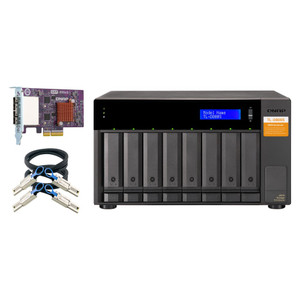
- Eight 3.5-inch SATA 6Gb/s Drive Bays: Eight full-size 3.5-inch bays accept standard desktop HDDs and SSDs at SATA 6Gb/s — no proprietary drive format, no adapter needed. You buy commodity drives and fill the shelf. At current 18TB HDD pricing, that puts 144TB raw within reach for a single enclosure.
- 144TB Raw Capacity Ceiling: With 8×18TB drives populated, the TL-D800C-US hits 144TB raw. For a NAS storage expansion scenario where you need a large sequential-write target for backup jobs or media archives, that headroom eliminates the need to chain multiple smaller enclosures.
- USB 3.2 Gen2 (10 Gbps) Type-C Connectivity: The 10 Gbps interface is the practical throughput ceiling for a single USB connection — fast enough to saturate a spinning HDD array on sequential reads and writes. Compare this to USB 3.2 Gen1 (5 Gbps) units where large backup transfers become a bottleneck; Gen2 halves that wait. A single cable carries both data and the bus negotiation, keeping the install clean.
- JBOD Architecture — Host Controls the Volumes: Because TL-D800C-US operates as a pure pass-through JBOD, the QNAP NAS sees each drive independently. You can assign individual drives to existing storage pools, create new RAID groups, or dedicate drives to specific volumes — all from the NAS OS. There is no embedded RAID controller to configure or fail independently.
- Desktop Form Factor: The enclosure sits on a desk or shelf rather than mounting in a rack. For branch offices, small NAS deployments, or workstation-side archive expansion, this avoids the overhead of rack hardware and keeps the footprint compact.
- Direct USB-C Integration with QNAP NAS: QNAP's NAS operating system (QTS/QuTS hero) natively recognizes the TL-D800C-US, so drive detection, health monitoring, and pool management work inside the familiar NAS interface without additional drivers or configuration steps.
Integration and Compatibility
The TL-D800C-US (often searched as TL D800C US) pairs with any USB 3.2 Gen2 Type-C host — QNAP NAS models with a USB-C expansion port being the primary target, and USB-C-equipped Windows PCs as a secondary use case. The drives appear as individual SATA devices to the host, which means compatibility extends to any OS or NAS platform that can manage pass-through JBOD devices over USB. For teams already running network attached storage and needing to scale capacity without replacing the NAS head unit, this enclosure adds eight drive slots with a single cable change. Pair it with a compatible USB-C cable rated for 10Gbps if the included cable is not available — not all USB-C cables support Gen2 speeds, so verify the cable spec before assuming full throughput.
Frequently Asked Questions
Q: Does the TL-D800C-US work with non-QNAP computers?
A: Yes. The TL-D800C-US connects via USB 3.2 Gen2 Type-C and presents drives as standard JBOD devices. Any Windows PC or compatible host with a USB-C port can use it, though QNAP NAS units running QTS or QuTS hero provide the tightest integration with native pool and volume management.
Q: What is the maximum storage capacity of the TL-D800C-US?
A: The enclosure supports up to 144TB raw capacity using eight 18TB 3.5-inch SATA drives (8 bays × 18TB). Actual usable capacity depends on the RAID or volume configuration managed by the host NAS or OS.
Q: Is the TL-D800C-US a RAID enclosure or a JBOD?
A: It is a pure JBOD. There is no embedded RAID controller — drives pass through individually to the host. RAID configuration, volume management, and drive pooling are handled entirely by the connected NAS or operating system.
Q: What USB specification does the TL-D800C-US use, and does the cable matter?
A: The TL-D800C-US uses USB 3.2 Gen2 Type-C, which delivers up to 10 Gbps. To achieve full throughput, the connecting cable must be rated for USB 3.2 Gen2 — not all USB-C cables support 10Gbps, so verify the cable specification before assuming maximum speed.
Q: Can I mix different drive capacities in the TL-D800C-US?
A: Yes. As a JBOD, each bay is independent — the host sees individual drives regardless of capacity. Mixing drive sizes is a function of the host's volume management, not the enclosure. Check your NAS documentation for any restrictions on mixed-capacity pool configurations.
Q: Does the TL-D800C-US support 2.5-inch drives?
A: The bays are designed for 3.5-inch SATA drives. Fitting 2.5-inch drives would require a 2.5-to-3.5-inch adapter bracket; this is not stated as a supported configuration in the product specifications.
The TL-D800C-US is the enclosure I reach for when a client's QNAP NAS has filled every internal bay and they need a fast path to more raw capacity without re-architecting the whole storage stack. The 10 Gbps USB 3.2 Gen2 interface is the key number here — it's enough headroom to keep backup windows from drifting overnight when you're pushing multi-terabyte jobs across eight drives simultaneously.
Technical Highlights:
- 10 Gbps USB 3.2 Gen2 Type-C: Doubles the throughput ceiling compared to Gen1 USB-C expansion shelves — sequential reads and writes on a fully populated array won't saturate the interface, so you get consistent transfer rates across long backup jobs.
- 144TB Raw via 8×3.5-inch SATA 6Gb/s Bays: Eight full-size SATA bays with no drive format lock-in means you can populate with any commodity 3.5-inch HDD. At 18TB per drive you hit 144TB raw in a single enclosure — that's a meaningful reduction in shelf count for large media or archive deployments.
- Pure JBOD Pass-Through Architecture: No embedded RAID controller means no single point of controller failure and no proprietary volume format to worry about when migrating the array. The NAS owns the data protection logic entirely.
Deployment Considerations:
- Verify the USB-C port on your NAS supports USB 3.2 Gen2 — some QNAP models have Gen1 (5 Gbps) Type-C ports, which would halve your throughput ceiling regardless of the enclosure spec.
- JBOD means no redundancy built into the enclosure — if you populate this shelf and present the drives as a single pool without RAID on the NAS side, a single drive failure results in data loss. Plan your NAS volume configuration before populating all eight bays.
This enclosure fits cleanest in a dedicated NAS-based backup target scenario — a QNAP running Hybrid Backup Sync, filling the internal bays with primary storage, and offloading archive or cold-tier data to the TL-D800C-US over the USB-C expansion port. The 10 Gbps connection keeps backup windows predictable even as datasets grow.