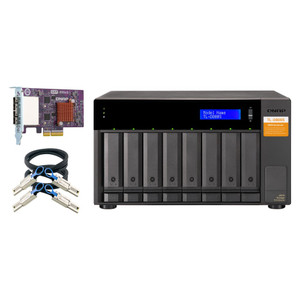
QNAP TL-D400S-US 4-Bay Desktop SATA JBOD Expansion Enclosure
The TL-D400S-US is a four-bay desktop JBOD storage expansion unit built for administrators who need to extend raw capacity on a QNAP NAS, Windows server, or Ubuntu system without adding another standalone box. It connects via a multi-lane SATA 6Gb/s interface using an included QXP PCIe host-bus adapter card, so installation is a single PCIe slot plus one SFF-8088 or SFF-8644 cable — no proprietary protocols, no driver stacks to manage. If your NAS or server is running out of internal bays, this is a direct path to more capacity at a predictable price point.
Key Features
- Four 3.5-inch SATA 6Gb/s Drive Bays: Each bay runs at the full 6Gb/s SATA ceiling, so modern high-capacity NAS drives won't be throttled by the enclosure. Four bays gives you a practical 40–80TB usable range with today's 10–20TB drives — enough headroom for most SMB surveillance archive or backup deployments.
- Bundled QXP PCIe Host Card: The included QXP expansion card means you're not sourcing a separate HBA. Install the card, run the SFF-8088 or SFF-8644 cable to the enclosure, and all four bays appear directly to the host. No extra cost, no compatibility guesswork.
- Multi-Platform Support — QNAP NAS, Windows, Ubuntu: Works equally well hanging off a QNAP NAS expansion slot, a Windows Server box, or an Ubuntu system. If your environment is mixed — a NAS for primary storage and a Linux server for backup — both hosts can use this enclosure type interchangeably.
- JBOD Architecture: Pure pass-through means the host controls all RAID decisions. If you want RAID 5 across the four bays, configure it at the NAS or OS level. If you want independent drives for separate backup jobs, that works too. The enclosure imposes nothing — which is exactly what you want in a JBOD.
- Operating Temperature 0–40°C (32–104°F): Standard commercial indoor range covers wiring closets, server rooms, and desktop deployments without active cooling concerns. Not rated for harsh or uncontrolled environments — keep it indoors.
- Net Weight 7.56 lbs (Gross 9.24 lbs): Light enough to sit on a desktop shelf next to a tower NAS without special mounting. Factor the gross weight for shipping or rack-shelf load planning.
- Storage Temperature -20–70°C (-4–158°F): Broad storage range means safe transport and warehousing in standard conditions without drive damage risk.
Integration and Compatibility
The TL-D400S-US integrates with QNAP NAS systems as a direct JBOD expansion via the included QXP PCIe card. It also pairs with Windows and Ubuntu servers, making it a practical fit in hybrid environments where NAS and server infrastructure share the same storage expansion hardware. For organizations building out a NAS storage infrastructure or adding overflow capacity to a network video recorder setup, the SATA 6Gb/s interface keeps throughput in line with what modern drives can deliver. Pair it with a compatible NAS hard drive to maximize bay utilization. If you are planning storage for a multi-camera system, review our storage and retention planning guide to size capacity correctly before purchasing drives.
Frequently Asked Questions
Q: What cable and host card are required to connect the TL-D400S-US?
A: The TL-D400S-US ships with a QXP PCIe host-bus adapter card. You connect the card to the enclosure using a SFF-8088 or SFF-8644 cable. Both cable types are supported; confirm which connector your card and enclosure ports use before ordering a cable separately.
Q: Does the TL-D400S-US support RAID?
A: The enclosure itself is a JBOD — it passes drives directly to the host with no onboard RAID controller. RAID configuration, if needed, is handled entirely at the host level (QNAP NAS storage manager, Windows Storage Spaces, or Linux mdadm/LVM).
Q: Which operating systems are compatible with the TL-D400S-US?
A: QNAP NAS systems, Windows PCs and servers, and Ubuntu Linux are all supported. Other Linux distributions may also work if they support the QXP host card driver, but only QNAP NAS, Windows, and Ubuntu are explicitly listed in the product evidence.
Q: What drive size does the TL-D400S-US accept?
A: The four bays accept standard 3.5-inch SATA hard drives. 2.5-inch SATA drives can typically fit with an adapter tray, but confirm tray compatibility for your specific drive before installing.
Q: What are the operating temperature limits for the TL-D400S-US?
A: Operating temperature is 0–40°C (32–104°F). Storage temperature range is broader: -20–70°C (-4–158°F). Deploy in a climate-controlled indoor environment; this unit is not rated for outdoor or uncontrolled-temperature installations.
The TL-D400S-US is a straightforward capacity play — four SATA 6Gb/s bays in a desktop enclosure connected through the bundled QXP PCIe card. I reach for this unit when a QNAP NAS is running out of internal bays and a client wants to avoid the cost and complexity of a second NAS unit. One PCIe slot, one SFF-8088 or SFF-8644 cable, and four new bays appear directly to the host. Hard to argue with that installation path.
Technical Highlights:
- SATA 6Gb/s per bay: Full 6Gbps SATA bandwidth to each drive means no enclosure-imposed bottleneck on sequential reads — relevant when archiving high-bitrate surveillance footage to high-density NAS drives.
- Bundled QXP PCIe HBA: Eliminates a separate HBA purchase and removes the compatibility guessing game. The host card and enclosure are matched from the factory.
- 7.56 lb net weight: Light enough to sit on a desktop shelf beside a tower NAS — no rack space consumed, no additional mounting hardware required for most deployments.
Deployment Considerations:
- The operating temperature ceiling is 40°C — adequate for a ventilated server room or wiring closet, but verify ambient temps in summer if the space lacks active cooling. Hot spots near UPS equipment can push enclosure temps toward that limit.
- JBOD means zero onboard intelligence — if the host goes offline or the PCIe card fails, all four drives are inaccessible simultaneously. Plan your host redundancy accordingly and do not use this as a standalone backup target without a secondary copy.
For a small business or branch-office QNAP NAS deployment where internal bays are exhausted and a second full NAS is cost-prohibitive, the TL-D400S-US is the most direct expansion path available — add four bays, keep the existing NAS OS and configuration intact.