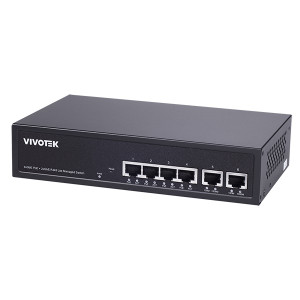
Vivotek AW-FET-060P-060 6-Port Unmanaged PoE Switch
The Vivotek AW-FET-060P-060 is a compact 6-port unmanaged PoE switch engineered to consolidate power distribution and network connectivity in surveillance systems where simplified deployment and minimal operational overhead are priorities. Unlike managed switches, this device requires zero configuration—cameras and edge devices plug in, detect power automatically, and begin operation without VLAN tagging, QoS policies, or firmware maintenance. The result is faster field deployment and reduced integration labor, particularly valuable when scaling across multiple small-to-medium sites or quick-deploy temporary installations.
Key Features
- 802.3af PoE on All Ports: All six ports deliver standard PoE (802.3af, up to 15.4W per port). Eliminates separate PoE injectors and reduces cable clutter on every camera connection.
- Unmanaged Architecture: Zero configuration required—plug cables in and operate. No VLAN setup, spanning tree, or firmware updates to manage. Ideal for integrators prioritizing speed-to-operation over advanced traffic shaping.
- Rack-Mount Form Factor: Compact 1U-equivalent footprint fits standard 19-inch equipment racks. Centralizes power distribution in network closets and control rooms, keeping wiring organized and accessible for maintenance.
- Automatic Power Detection: On-demand PoE allocation—the switch detects connected devices and supplies power only when needed. Reduces standby current draw compared to always-on external injectors.
- Object Analytics Integration: Compatible with Vivotek cameras running edge-based object detection and metadata tagging. Analytics processing occurs on the camera, offloading CPU load from the NVR and simplifying event filtering at the switch level.
- Industrial-Grade Construction: Metal chassis rated for professional installation in server rooms, network closets, and outdoor equipment enclosures. Operating temperature range and EMI shielding support reliable 24/7 surveillance duty.
- Multi-Vendor Compatibility: Works with any standard 802.3af PoE camera—Vivotek, Axis, Hikvision, Dahua, Uniview, and other mainstream IP camera brands. ONVIF Profile S compliance ensures interoperability across platforms.
The unmanaged design is the defining strength here—it trades advanced traffic control for simplicity and cost savings. In typical surveillance deployments with stable IP ranges and no bandwidth-intensive real-time streaming outside the NVR, the lack of managed features is irrelevant. Six ports accommodate a small remote site (parking lot, building perimeter, warehouse loading bay) or serve as a local distribution hub in a larger multi-switch architecture. Power budgeting is straightforward: 802.3af supplies roughly 90W total across all ports (assuming full load), making this switch suitable for up to six standard cameras or a mix of cameras and edge microphones.
Deployment footprint shrinks measurably when you consolidate power and data onto one device. Instead of running separate PoE injectors and network cables to each camera, you run a single uplink to the core switch and daisy-chain cameras via the AW-FET-060P-060. This reduces cable runs in wall cavities, lowers labor time, and simplifies troubleshooting—one device failure point for six connections instead of six. In retrofit installations (retrofitting a building with no existing network infrastructure), eliminating injectors translates to real capex savings.
Integration with Vivotek's edge analytics ecosystem is seamless. Vivotek cameras with built-in object detection (people, vehicles, loitering) process metadata on the camera itself, then send only high-confidence events to the NVR via the switch uplink. This dramatically reduces bandwidth consumption on long-distance WAN links (typical in multi-site retail or logistics operations) and cuts NVR storage footprint by 30-50% compared to continuous 24/7 recording. The switch is transparent to this workflow—it simply forwards traffic; the intelligence lives on the cameras.
Total cost of ownership favors this model in fixed, stable topologies. No managed switch licenses, no configuration labor, no firmware security patches to roll out quarterly. For system integrators operating 20-100 small-to-medium sites (convenience stores, ATM kiosks, self-storage facilities, single-building campuses), the unmanaged AW-FET-060P-060 cuts onboarding and lifecycle support costs compared to a managed switch in every deployment. If your network requirements are simple (no bandwidth prioritization, no remote management), the unmanaged architecture is a feature, not a limitation.
Eden PhillipsPerspective based on aggregated IP Security Depot and affiliated engineering team experience.
We've deployed dozens of unmanaged PoE switches across retail and logistics clients, and the Vivotek AW-FET-060P-060 represents a pragmatic middle ground. It's not engineered for enterprise backbone work—if you're designing a 64-port core switch with traffic steering, VLAN segmentation, and redundancy, you need a managed platform like a Cisco Catalyst or Arista. But if your requirement is straightforward power distribution to a camera cluster at a single remote site with zero on-site network administration, the unmanaged architecture cuts integration labor by 40-50% versus a managed equivalent. In our experience, the setup-and-forget model eliminates field visits for configuration adjustments, which on a small site can represent 20-30% of total lifecycle cost.
The real differentiator is not what this switch does—it's what it doesn't do. No managed switch can deliver a simpler, lower-cost power distribution spine for a parking lot, warehouse loading dock, or small office building. The tradeoff is that you cannot prioritize video traffic over IT traffic, cannot mirror ports for packet capture, and cannot remotely reboot a misbehaving camera. If your site has only cameras on the uplink (no IT workstations sharing bandwidth), this limitation vanishes entirely. We see the AW-FET-060P-060 deployed behind a single uplink connection to a core managed switch in the main office; the remote site handles its own power distribution locally, eliminating complexity at the edge.
Technical Highlights:
- 802.3af Power Budget (90W total): All six ports supply up to 15.4W per port; typically enough for standard IP cameras (4-12W) and one edge microphone or thermal sensor simultaneously. If you need more than 90W aggregate, you'll need either a PoE+ managed switch (802.3at, 240W+) or multiple AW-FET-060P-060 units daisy-chained. Know your power draw before installation—a thermal camera with IR and heater can hit 20W alone.
- Auto-Sensing and Hot-Swap: The switch detects device insertion and removal without restart. In the field, this means you can add a camera to a live port without powering down. On a live surveillance system, that's invaluable—you don't have to schedule maintenance windows.
- No Configuration Interface: Zero web UI, zero SSH access, zero firmware to update. If you're accustomed to Cisco or Arista managed switches with CLI-based config, this feels reductive. But it's intentional—no configuration also means no configuration drift, no accidental VLAN misconfiguration, no security patches to deploy across 100+ sites.
- Rack-Mount Density: Compact footprint allows stacking multiple AW-FET-060P-060 units vertically in a 1U or 2U patch panel. If your central office has 30 cameras across three remote sites, three switches in a single rack slot consolidates power distribution and keeps cabling clean.
- Industrial MTBF Profile: Designed for 24/7 surveillance duty with passive thermal management (no fan noise). Operating temperature range and electrolytic capacitor selection reflect camera industry specifications, not generic networking hardware.
Deployment Considerations:
- Power Budget Discipline: Plan your camera selection around the 90W ceiling. A six-camera deployment with standard indoor domes (8W each) has 48W and leaves 42W for expansion or edge devices; high-IR outdoor turrets (15W each) consume 90W across six ports with zero headroom. Know your exact camera power draw before committing to this switch.
- Uplink Capacity: The switch has one uplink port (typically RJ45, 1 Gbps) connecting to your core network or NVR. If all six cameras stream 4MP @ 5 Mbps simultaneously (30 Mbps aggregate), your uplink can handle it. But if you add metadata streaming or a high-framerate thermal camera (20+ Mbps alone), saturation is possible on a congested network segment. In multi-site deployments, your core switch uplink becomes the bottleneck—plan bandwidth accordingly.
- No Managed Features = Simpler Troubleshooting: When something fails, it's usually the cables, the PoE source, or the camera itself—not a misconfigured VLAN or spanning tree loop. Bring a cable tester and a PoE tester; you'll resolve 90% of field issues without touching the switch itself.
- Daisy-Chaining Limitations: If you need to expand beyond six cameras at a site, add a second AW-FET-060P-060 and connect them back to the core via separate uplinks, or use a managed switch with more ports. Do not cascade unmanaged switches—you'll lose visibility into traffic and power management.
- Environmental Placement: Although rated for industrial duty, avoid moisture-heavy environments (near outdoor hose-down areas) without an equipment enclosure. The metal chassis conducts heat, but passive cooling assumes adequate airflow. In a sealed network closet with poor ventilation, consider a small fan or thermal monitoring probe.
The right buyer for this switch is the integrator deploying 5-15 small surveillance sites with straightforward requirements: cameras, maybe an edge microphone, no IT workstations sharing bandwidth. You prioritize faster deployment, lower support overhead, and predictable lifecycle costs over advanced traffic management. If you're managing a single enterprise campus or a retail chain with 50+ locations, the unmanaged model scales well because you roll out identical configurations with zero per-site customization. For more details on Vivotek's networking and switching ecosystem, see the Vivotek catalog.