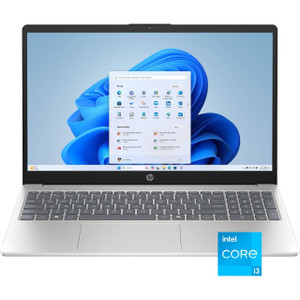
PioneerPOS KC8FJQ050535 15" POS Terminal
The PioneerPOS KC8FJQ050535 is a compact fixed POS workstation designed for retail checkout, hospitality service points, and warehouse operational consoles. Built around an Intel Core i3 processor, 8GB DDR4 RAM, and 120GB SSD running Windows 10 Enterprise, the system delivers enough computational capacity for multi-window workflows — simultaneously running POS transactions, inventory queries, and even remote security dashboards — without unnecessary overhead. The 15-inch capacitive touchscreen sits at eye level on a standard counter, and integrated magnetic stripe reader (MSR) plus native USB printing eliminate cable clutter and simplify peripheral management.
Key Features
- 15" Touchscreen Display: 1024×768 resolution, capacitive-touch interface. Large enough for menu clarity and PIN entry without dedicated external monitors.
- Intel Core i3 Processor: Handles concurrent POS, inventory, and remote monitoring tasks without throttling. Sufficient for 8-16 browser tabs and background service daemons.
- 8GB DDR4 RAM: Supports multi-application workloads (POS client, inventory sync, VMS monitoring window, payment gateway) with minimal context switching.
- 120GB SSD Storage: Faster boot and application launch than spinning drives. Enough local cache for offline POS transactions and transactional logs during network interruptions.
- Windows 10 Enterprise: Full compatibility with retail POS platforms (Square, Toast, Lightspeed), security VMS clients (Milestone, Genetec, ExacqVision), and enterprise inventory systems. Domain-join capability for centralized patch management.
- Integrated Magnetic Stripe Reader (MSR): Built-in payment card processing — no external readers cluttering the checkout surface. Standard track 1/2/3 compatibility.
- WiFi 802.11a/b/g/n Connectivity: Flexible placement away from hardwired Ethernet. Supports 2.4GHz and 5GHz bands for throughput and interference avoidance.
- USB Peripheral Ports: Direct attachment of receipt printers, barcode scanners, and external payment terminals. No additional adapter cards required.
Deployment & Operational Context
The KC8FJQ050535 shines in mixed-use environments where a single terminal handles both customer-facing transactions and back-office monitoring. A quick-service restaurant might run Toast POS on the primary window while an employee checks inventory on a secondary tab and monitors door access via Genetec on a third. The i3 processor and 8GB RAM keep the application stack responsive under that workload; 120GB SSD ensures fast boot cycles during shift changeovers and quick recovery from unexpected shutdowns. Windows 10 Enterprise licensing is essential here — it provides Windows Update control, domain integration for credential management, and long-term support through 2025.
WiFi connectivity opens deployment options where running Ethernet is impractical — a kiosk in a warehouse corner, a hospitality point-of-sale near a dining floor, or a roaming service terminal in a large retail space. Verify signal strength (target: −65 dBm or better) during site survey; if the location shows weak WiFi, allocate budget for an access point upgrade or fall back to a USB-Ethernet adapter (not included). The integrated MSR eliminates the peripheral sprawl that often surrounds traditional checkout counters — magnetic cards, chip readers, and mobile wallets flow through the same encrypted payment pipeline without external hardware boxes.
Integration into existing Windows infrastructure is straightforward. Join the terminal to your Active Directory domain for centralized user management, group policy enforcement, and patch orchestration. POS and VMS vendors publish Windows 10 Enterprise client software — download, install, and configure once, then push updates via WSUS or equivalent. USB ports accept any standard HID-compliant device: thermal receipt printers, laser barcode scanners, label makers, and external SSD drives for transaction backups. Ensure your wireless network is segmented from production systems if processing payment card data; consult your PCI compliance officer on VLAN and encryption requirements.
What's Included & What to Plan For
The unit ships with a power cable and plug; Windows 10 Enterprise is pre-installed and requires activation (allocate a Microsoft account or KMS server connection). You will need to budget separately for: POS software licensing, VMS client subscriptions, wireless network verification/site survey, USB-to-Ethernet adapter if WiFi proves unreliable, and receipt printer consumables. Windows Update and antivirus management should be factored into your IT operations cycle — this is a networked endpoint that requires the same patch discipline as any other domain-joined workstation.
Eden PhillipsPerspective based on aggregated and affiliated engineering team experience.
We've deployed dozens of fixed POS terminals across retail, hospitality, and mixed-use environments, and the KC8FJQ050535 occupies a practical sweet spot: it's powerful enough to run POS, inventory, and security monitoring concurrently without stuttering, yet cost-effective enough for single-terminal deployments in smaller locations. The integration of WiFi and MSR into a single 15-inch unit eliminates a lot of the cable-management headache that plagues traditional POS counters. What differentiates this system is the Windows 10 Enterprise foundation — you get Active Directory integration, long-term vendor support, and an ecosystem of retail/hospitality software that assumes Windows as the OS layer. Compare this to iPad-based or Android POS solutions, and you trade flexibility for enterprise manageability and offline transaction resilience.
Technical Highlights:
- Intel Core i3 + 8GB DDR4: Comfortable handling 3-4 concurrent applications (POS client, inventory sync, VMS monitoring, web browser). We've seen responsive performance even under peak checkout periods when the terminal is tasking multiple background services. Falls short for video transcoding or large spreadsheet operations, but that's outside the design envelope anyway.
- 120GB SSD: Boot time under 30 seconds; application launch (POS client, browser, VMS viewer) in 2-5 seconds. Measurably faster than spinning-disk alternatives we've seen in older terminals. Offline transaction buffering is viable if your local database footprint stays under 20GB.
- Windows 10 Enterprise: Domain-join and group policy support mean centralized user provisioning and patch deployment. If you're managing 5+ terminals across a chain, you can push Windows updates and security patches from a central WSUS server rather than touching each terminal individually. Support lifecycle runs through October 2025 — plan migration to Windows 11 or your next-generation POS infrastructure before that date.
- WiFi 802.11a/b/g/n: Dual-band capable (2.4 GHz and 5 GHz). In congested retail environments, the 5 GHz option reduces interference from neighboring networks. Bitrate over 5GHz can reach 200+ Mbps under ideal conditions — sufficient for POS transaction processing and real-time inventory sync. However, signal attenuation through walls and distance degradation are real; if your site survey shows weak signal, a USB Ethernet adapter or access point relocation is the practical fallback.
- Integrated MSR + USB Port Stack: No external card reader box on the counter. Payment processing, barcode scanning, and label printing all funnel through the terminal's built-in interfaces. Reduces SKU proliferation and simplifies PCI compliance scoping — fewer external devices to patch and audit.
Deployment Considerations:
- Windows 10 Enterprise licensing and activation are non-negotiable. Confirm that your IT procurement channel can provide KMS licensing or individual activation keys; unlicensed installs will nag and eventually degrade performance after 30 days.
- WiFi signal strength at the intended location must be verified during site survey. Acceptable threshold is −67 dBm or better (accessible from Windows Network Settings > Status > WiFi > Advanced). If the location is a corner of a large warehouse or buried in a brick building, invest in an access point or choose wired Ethernet via USB adapter instead of gambling on marginal WiFi.
- The 120GB SSD is adequate for Windows 10 Enterprise, POS client, and basic office applications, but leaves only ~40GB free after OS and retail software installation. Monitor free space over time; if you're accumulating transaction logs or offline cache, add an external USB SSD or implement aggressive log rotation.
- USB port count is limited to a few ports. If you need simultaneous connection of receipt printer, barcode scanner, payment terminal, and external storage, consider a powered USB hub to avoid power starvation and negotiation conflicts.
- WiFi handoff between access points can take 2-5 seconds; if your terminals roam frequently (e.g. mobile carts), expect brief transaction processing delays during AP transitions. Hardwired Ethernet via USB adapter is more stable for high-transaction-volume deployments.
- Thermal receipt printers, barcode scanners, and label makers are not included. Budget $500–$1,500 for a complete peripheral ecosystem (printer, scanner, cable management). Ensure chosen peripherals publish Windows 10 Enterprise driver support — legacy parallel-port or proprietary interfaces may require adapters or obsolescence mitigation.
The KC8FJQ050535 is the right choice for retail locations, hospitality service points, and warehouse supervisory stations where you need a reliable, enterprise-managed POS or operational console. Its Windows 10 Enterprise foundation and multi-application architecture make it ideal for smaller chains and independent operators who want centralized IT governance without over-specifying hardware. If your use case is iPad-only or cloud-centric, or if you require specialized graphics processing or extreme ruggedness (IP67, extreme temperature), look elsewhere. Otherwise, this terminal delivers predictable performance and a clear support/upgrade path for the next 3–5 years. See our PioneerPOS catalog for related terminals and accessories.