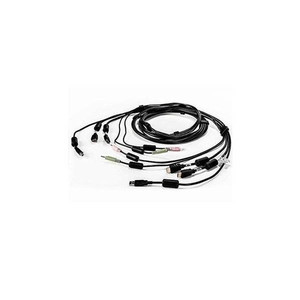
Vertiv CBL0196 10ft HDMI-to-DVI-D Single-Head KVM Cable
Overview
The Vertiv CBL0196 is a 10-foot HDMI-to-DVI-D single-head cable built specifically for the Avocent SV240DPH and SV2160DPH KVM switch platforms. If you're deploying or expanding either of those switch models, this is the factory-specified cable that eliminates the guesswork around connector compatibility and signal integrity. It carries digital video from an HDMI source port on the KVM switch through to a DVI-D Digital Video connector at the workstation or display end — a common requirement in control rooms and server environments where HDMI-equipped KVM switches feed DVI-D-only monitors or legacy video inputs.
The cable handles both USB and dual-audio connections in a single bundled assembly, meaning one run from switch to workstation covers video, keyboard/mouse, and audio — no separate audio cable daisy-chained alongside. At 10 feet, it gives you enough reach for rack-adjacent workstation setups without excess slack to manage.
Key Features
- HDMI Digital Audio/Video input: The HDMI end connects directly to the KVM switch's video output port, carrying uncompressed digital video without analog conversion — no signal degradation introduced at the switch interface.
- DVI-D Digital Video output: The DVI-D end is digital-only (no analog pins), which means it's wired for displays and graphics cards that require a clean DVI-D signal. If your monitor takes DVI-I or DVI-A, this cable won't fit — DVI-D is digital-only by design.
- USB connectivity included: Bundles USB along with video in a single cable assembly, keeping cable runs tidy and reducing the number of separate connections between the KVM and the connected workstation.
- Dual-audio channels: Two audio runs in the same cable — typically used to carry both speaker output and microphone input, covering standard two-way audio needs at the workstation without a separate audio cable.
- 10-foot cable length: Sized for rack-adjacent deployments where the KVM switch and the controlled workstation or display sit within a standard operator console or adjacent rack bay. Long enough for most control-room desk-to-rack distances without unnecessary slack.
- Verified compatibility with Avocent SV240DPH and SV2160DPH: Vertiv specifies this cable for both models by name — which matters when a KVM platform uses proprietary or keyed connector arrangements. Using the specified cable avoids the silent-failure scenarios that come with generic substitutes.
Integration & Compatibility
The CBL0196 is compatible with the Vertiv Avocent KVM switch models SV240DPH and SV2160DPH. These are DisplayPort/HDMI-capable desktop KVM switches in the Vertiv Avocent SV series, designed for multi-display workstation switching in IT and control environments. The cable bridges the HDMI output on the switch to a DVI-D input, which is a common configuration when the controlled computer or monitor predates HDMI adoption or uses a DVI-D-only graphics card.
If you're building out a KVM accessories kit for an SV240DPH or SV2160DPH deployment, confirm the number of controlled ports you need to cable — each connected computer workstation requires its own CBL0196 run back to the switch. For multi-head configurations, review the switch's documentation for which cable assembly applies to each head position.
Note the California Proposition 65 warning on this product: the plastic used in cable manufacturing may expose users to lead and lead components. This is a standard disclosure for most cable assemblies sold in California and does not affect the cable's electrical or mechanical performance in commercial deployments.
Frequently Asked Questions
Q: Which KVM switches is the CBL0196 compatible with?
A: The CBL0196 is specified by Vertiv for use with the Avocent SV240DPH and SV2160DPH KVM switches. These are the only models confirmed in the manufacturer's compatibility data for this cable.
Q: Does the CBL0196 support analog video signals?
A: No. The DVI-D connector on the workstation end is digital-only — it does not carry analog pins. It will not mate with DVI-I or VGA adapters expecting an analog signal. Both ends of this cable are strictly digital video.
Q: Does this cable include audio connections?
A: Yes. The CBL0196 bundles dual-audio channels (two audio runs) along with the HDMI, DVI-D, and USB connections in a single cable assembly, covering both speaker output and microphone input in one run.
Q: What is the cable length of the CBL0196?
A: The CBL0196 is 10 feet (approximately 3 meters) in length, suitable for rack-adjacent or desk-to-rack workstation connections.
Q: Can the CBL0196 be used with non-Avocent KVM switches?
A: Vertiv's compatibility documentation only confirms this cable for the SV240DPH and SV2160DPH. Using it with other KVM platforms may result in connector or signaling mismatches — verify pin-out and connector compatibility with the switch manufacturer before substituting.
When integrators ask me about cabling for the Avocent SV240DPH or SV2160DPH, my first question is always whether they've sourced the correct factory-specified cable assembly. The CBL0196 is Vertiv's answer for HDMI-to-DVI-D single-head runs on those platforms — a bundled 10-foot assembly carrying video, USB, and dual audio in one cable rather than three separate runs.
Technical Highlights:
- DVI-D Digital-Only Output: The DVI-D end carries no analog pins — if the target monitor or KVM input requires DVI-I or analog VGA via adapter, this cable won't work. It's the right fit for purely digital DVI-D displays, and the wrong fit for anything else.
- Bundled USB + Dual Audio: Combining USB and two audio channels with the video connection in one 10-foot assembly reduces the cable count between KVM and workstation from three runs to one — a real benefit in dense operator console installations where cable management is already at its limit.
- 10-foot reach: Sized for rack-adjacent setups — enough length for standard desk-to-rack distances in a control room or data center console, without excess cable to coil and secure.
Deployment Considerations:
- Each workstation port on the SV240DPH or SV2160DPH needs its own CBL0196 — plan cable quantities based on total controlled-computer port count, not switch count.
- The Prop 65 lead disclosure is standard for this class of cable and a California compliance item, not a signal or performance concern — but document it in your installation records if working in regulated facilities.
The CBL0196 is the right call specifically for SV240DPH and SV2160DPH deployments where controlled computers have HDMI output and the KVM's workstation-side connection is DVI-D — a common scenario when refreshing operator consoles that mix newer KVM hardware with older DVI-D monitors.