
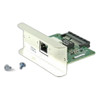

Zebra P1007564 Internal Print Server Kit IPv6
IPv6 internal print server module for Zebra modular printers
Usually Ships in 2-3 Weeks
Free shipping over $499


Manufacturer-verified compatible cameras, recorders, mounts, accessories, and licenses for this product. Adjust quantities and add the entire bundle to your cart in one click.
Questions about this product? Free pre-sales support from a senior specialist — product questions, compatibility checks, BOM quotes, price confirmation — typically answered within one business day. Need camera placement or system design work? Engineering time is $175 per hour (qty 1 = 1 hour). Hardware buyers get up to one hour ($175) credited back on their order.
The Zebra P1083320-039 is an internal print server kit engineered for integration into Zebra thermal printers in the ZT600 series. This kit adds IPv4 Ethernet connectivity directly inside the printer chassis, eliminating the need for an external print server appliance—meaning one less box to power, mount, and manage in your warehouse or distribution facility. The P1083320-039 brings centralized network job routing and remote printer administration into environments where space and cable clutter matter.
The P1083320-039 is an internal module; installation requires opening the ZT600 printer chassis and seating the kit in the designated slot. This is not a field-swappable hot-plug component—plan for a brief offline window when installing. Zebra and most professional label software vendors (such as Bartender, Nicelabel, and Seagull) support standard SNMP and IPP (Internet Printing Protocol) for networked thermal printers, so your existing label application will likely recognize the networked printer once the kit is powered up and assigned a DHCP or static IP address.
If you operate a heterogeneous print environment—mixing thermal, inkjet, or office printers—the P1083320-039 does not replace a centralized print server or queue management tool. It integrates the ZT600 into standard network printing workflows, but does not manage print jobs across different printer brands or types. For that level of abstraction, you still need your WMS or a dedicated print-job router.
Q: Can I install the P1083320-039 myself, or do I need a technician?
A: The kit is designed for installation into the printer chassis. While not impossible for a technical operator, Zebra and most integrators recommend professional installation to avoid damage to the printer's internal connectors. Check with your printer's original equipment documentation or contact a certified integrator if you're unfamiliar with printer internals.
Q: What if my ZT600 printer is already in the field and running?
A: The print server kit can be installed as a retrofit into an existing ZT600, but it requires taking the printer offline. Plan a service window. Once installed, no further configuration is necessary beyond assigning the printer an IP address on your network.
Q: Does the P1083320-039 work with my existing label software?
A: If your label software (Bartender, Nicelabel, Seagull, or your WMS) supports network-attached thermal printers via SNMP or standard Windows/network printer ports, yes. The kit makes the printer appear as a network device, so your software treats it like any other networked printer. Test with a single printer and one workstation before rolling out across your facility.
Q: Is there a performance or throughput difference between USB and network printing on the same ZT600?
A: Network printing via Ethernet is typically comparable to high-speed USB in throughput, assuming your network isn't congested. Ethernet's advantage is multi-user access and remote administration—not raw speed. In a warehouse with multiple label stations, network printing prevents device locking (where one station 'owns' the printer via USB) and allows dynamic load balancing.
Q: What happens if my network fails—can the printer still work offline?
A: No. The P1083320-039 converts the printer to network-only operation. If your network is down, the printer cannot receive jobs over Ethernet. If you need offline capability, you must retain a USB port connection to at least one workstation or keep a separate print queue buffered on the printer itself (Zebra ZT600 units support some onboard storage). Plan your network redundancy accordingly.
Q: Do I need to update firmware after installing the P1083320-039?
A: Check the Zebra datasheet and your printer's current firmware version. Some installations may require a firmware update to fully support the print server kit. This is typically a one-time task performed from a networked workstation using Zebra's printer management utilities.

The Zebra P1083320-039 is a straightforward internal retrofit, but it fundamentally changes how your ZT600 participates in a networked printing architecture. Once installed, the printer becomes dependent on IPv4 Ethernet availability—there's no fallback to USB unless you physically remove the kit or retain a separate USB connection as a secondary option.
Technical Highlights:
Deployment Considerations:
Best deployment scenario: multi-station label operations in controlled environments (warehouses, logistics hubs) where your network is stable, managed, and your WMS software already supports standard network printing. Skip this kit if your facility operates on a flaky network, relies on offline label queuing, or uses legacy serial-only print drivers.

Manufacturer-verified compatible cameras, recorders, mounts, accessories, and licenses for this product. Adjust quantities and add the entire bundle to your cart in one click.
IPv6 internal print server module for Zebra modular printers

Internal print server for Zebra ZT200 series with Ethernet networking

Wi-Fi print server module for Zebra ZT400 series label printers
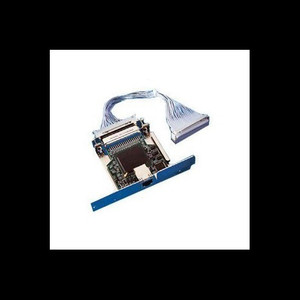
N internal 10/100 Ethernet Print Server kit designed to add network connectivity to compatible Zebra thermal label printers

Print mechanism hardware kit for Zebra ZT620/ZT62 thermal printers
Looking for more Zebra products? Shop the full Zebra catalog →
Support services and planning resources for commercial surveillance, access control, and infrastructure deployments.
Fixed scope • Fixed price