CyberPower CPH430PB 4-Port USB 3.0 Hub
Overview
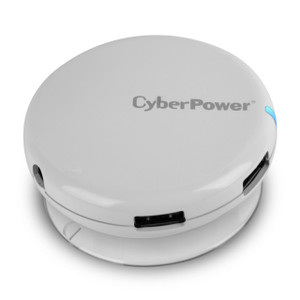
The CyberPower CPH430PB is a desktop USB 3.0 hub that consolidates four USB ports into a single connection point. Built for environments where desk or workstation space is constrained and you need fast, simultaneous access to multiple USB devices—surveillance control systems, backup drives, printers, or mobile device charging. The hub supports data transfer up to 5 Gbps (USB SuperSpeed), backward compatible with USB 2.0 and 1.1 devices, so legacy equipment won't slow you down.
Key Features
- USB 3.0 SuperSpeed (5 Gbps): Ten times faster than USB 2.0. Real benefit: if you're transferring surveillance footage or firmware images to networked devices, this speed cuts wait time dramatically. A 1GB file moves in seconds instead of minutes.
- 4 USB Type-A Ports: Four independent connections mean you can charge a mobile hotspot, plug in a wireless keyboard receiver, connect a backup USB drive, and attach a USB camera all simultaneously without daisy-chaining hubs or hunting for wall outlets.
- 900 mA per port charging: Each port delivers 900 mA at 5V DC, enough to charge most USB devices (tablets, phones, backup batteries) at full speed. The hub shares 3.6A total power from the AC adapter, so heavy simultaneous charging across all four ports will self-throttle—manage expectations for multi-device scenarios.
- AC Adapter (5V / 3.6A): Powered hub, not passive. Means your host USB port isn't starved of power. The CPH430PB draws its own current and distributes it to downstream devices, critical when you're running power-hungry peripherals like external SSDs or high-current phone chargers.
- Suction Cup Mount: Desktop model with suction cup feet—sits flat on any smooth surface (desk, monitor stand, glass partition) without sliding or tipping. Stable cable management when you're plugging/unplugging frequently.
- LED Power Indicator: Single LED shows when the hub is powered and receiving AC input. Useful for troubleshooting: if a device isn't charging, you know instantly whether the hub itself is live or if the wall outlet is dead.
- Backward Compatible (USB 2.0 / 1.1): Older USB 2.0 devices (legacy barcode scanners, older printers, heritage surveillance hardware) plug in and work fine. They'll run at USB 2.0 speeds (480 Mbps), not 5 Gbps, but that's standard behavior—no incompatibility surprises.
- RoHS Compliant: Meets Restriction of Hazardous Substances standards. If your organization has e-waste or supply-chain compliance requirements (healthcare, finance, education), this is documented.
- Limited Lifetime Warranty: CyberPower backs the CPH430PB with a lifetime warranty. Real value for stationary equipment—you're not replacing this hub every two years due to a failed port.
- Operating Temperature Range (32–104°F / 0–40°C): Comfortable room-temperature operation. Not a field-hardened outdoor device—keep it indoors or in climate-controlled environments. Exceeding 40°C will throttle performance or shut the hub down as a safety measure.
Integration & Compatibility
The CPH430PB works with any device that accepts a USB Type-A host connection: Windows PCs, macOS systems, Linux workstations, and single-board computers (Raspberry Pi, NVIDIA Jetson) that support USB 3.0 or 2.0 host mode. Plug the hub into a powered USB port on your surveillance NVR, access point, or desktop machine. The four downstream ports present as standard USB Type-A, so any standard USB peripheral (external drive, network adapter, wireless receiver, barcode scanner) connects without custom drivers or software—it just works.
This hub does not replace network-attached storage or IP-based device distribution. It's a local USB convenience tool—ideal for a control station or small office cluster where you need to share USB printers, external backup drives, or mobile charging without running extension cables to each desk.
What's in the Box
The CPH430PB ships with: 1x USB 3.0 hub, 1x AC power adapter (5V / 3.6A), and 1x user documentation.
Frequently Asked Questions
Q: Can I daisy-chain multiple CPH430PB hubs together?
A: Technically, yes—you can plug one hub into another hub's port. However, daisy-chaining introduces latency and power-sharing complexity. Each additional hub in the chain reduces available power per port. For heavy multi-device scenarios, a single powered hub with higher amperage (if available in the product family) is more reliable than stacking multiple hubs.
Q: What's the warranty on the CPH430PB?
A: The CPH430PB carries a limited lifetime warranty from CyberPower. Coverage typically includes manufacturing defects and component failure, but not physical damage or user misuse. Check the included documentation for exact coverage terms and claim procedures.
Q: Will the CPH430PB work with my older USB 2.0 devices?
A: Yes. The hub is backward compatible with USB 2.0 and USB 1.1 devices. They'll operate at their native speeds (480 Mbps for USB 2.0, 12 Mbps for USB 1.1), not the hub's 5 Gbps maximum, but there's no compatibility issue—plug and play.
Q: Can I charge four devices at full speed simultaneously?
A: The hub provides 3.6A total power shared across all four ports. If you connect four devices each drawing 900 mA simultaneously (3.6A total), charging works at rated speed. If you exceed 3.6A total draw, the hub will either throttle individual ports or shut down to protect the AC adapter. Avoid overloading all four ports with high-current devices (fast phone chargers, tablets, power-hungry external drives) all at once.
Q: Is the CPH430PB suitable for outdoor or industrial environments?
A: No. The CPH430PB is rated for indoor operation (32–104°F / 0–40°C). It lacks environmental sealing (no IP rating), so moisture, dust, or extreme temperature will degrade performance or cause failure. Deploy it only in climate-controlled office, lab, or control room settings.
Q: Does the CPH430PB require driver installation?
A: No drivers needed. USB hubs are plug-and-play on all modern operating systems (Windows, macOS, Linux). Plug the AC adapter into a wall outlet, connect the hub's upstream port to a USB port on your computer, and the downstream ports are immediately available.
I've deployed the CPH430PB in several small control rooms and back-office setups where desk real estate is tight and USB device sprawl gets out of hand. The 5 Gbps throughput is genuinely useful if you're moving surveillance footage or firmware images regularly, and the per-port 900 mA charging capacity keeps a mobile hotspot or backup battery alive during an 8-hour shift. What sold me on the CPH430PB was the AC adapter—this isn't a bus-powered hub that starves devices when you plug in four things at once.
Technical Highlights:
- USB 3.0 SuperSpeed (5 Gbps): Real-world transfer speed is roughly 400–450 Mbps due to USB protocol overhead, but that's still 10x faster than USB 2.0's 480 Mbps theoretical max. A 2GB firmware file moves from archive to device in under 5 seconds instead of 40 seconds. Time matters when you're rolling out updates across a fleet.
- 900 mA per port @ 5V DC: Enough juice to fast-charge a phone or power a small external SSD simultaneously with three other devices. The 3.6A shared power budget means you won't run into the "why isn't my phone charging?" problem that plagues passive hubs or severely undersized AC adapters.
- Suction cup mount with stable desktop footprint: The hub won't slide off your monitor stand or desk when you're plugging/unplugging cables. Sounds trivial until you're yanking a USB drive out of a wobbly hub five times a day and it tips over onto your keyboard.
Deployment Considerations:
- The CPH430PB is rated only to 40°C (104°F). If you're thinking about deploying this in an equipment cabinet, an unvented closet, or near a heat source, it will thermal-throttle or shut down. Keep it on the desk or in an air-conditioned room.
- The 3.6A power budget is shared across all four ports. I've seen users try to charge three tablets and run an external SSD simultaneously—that's roughly 3.5–4.0A demand, which causes the hub to brown-out or reset under load. Document that constraint in your team's setup guide.
The CPH430PB is a solid fit for control room or office cluster deployments where you need reliable multi-device USB access and aren't expecting industrial-grade durability. If you're building a fixed workstation and need local USB convenience without buying separate chargers and cables, this hub pays for itself in desk space and cable clutter reduction.