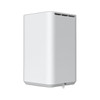
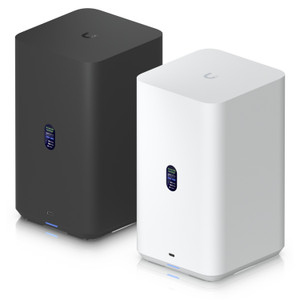
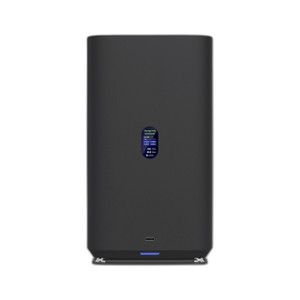
Ubiquiti UNAS-2-W 2-Bay NAS with 2.5 GbE UniFi Storage
The Ubiquiti UNAS-2-W is a compact network-attached storage device purpose-built for UniFi Protect camera deployments and distributed recording scenarios. It accepts two 3.5-inch SATA HDDs and connects via 2.5 GbE to UniFi Switch infrastructure, eliminating the architectural constraint of centralized NVR boxes. The included PoE++ adapter means you power it directly from a compatible PoE++ switch port — no separate PSU installation, no additional electrical work. For branch offices, remote buildings, or multi-site deployments where local failover storage is required, this device bridges the gap between cloud-dependent systems and fixed infrastructure.
Key Features
- Dual 3.5" HDD Bays: Supports standard SATA drives up to 8TB or 10TB per bay (tested with drives meeting UniFi compatibility matrix). Capacity scales from 4TB to 20TB depending on drive selection and recording retention policy.
- 2.5 GbE Ethernet Port: 2.5 Gigabit uplink — sufficient for 8–16 concurrent 4MP Protect camera streams at 15 fps without network saturation. Pairs with UniFi Switch 24, UniFi Switch 48, or Dream Machine Pro (all feature 2.5G uplink ports).
- PoE++ Power (802.3bt): Draws approximately 12–18W under normal operation. Included adapter eliminates separate 12V PSU; powers directly from any 802.3bt-compliant switch port with adequate budget allocation.
- UniFi Network App Integration: Configuration, storage monitoring, and playback retrieval occur in the native UniFi Network application. No third-party NAS UI, no separate login — unified dashboard with cameras, switches, and network devices.
- Wall/Desktop Mounting: Compact form factor (approximately 6" × 4" × 3") mounts on a wall bracket or sits on a shelf in a network closet. Reduces real-estate footprint vs. rack-mount NAS appliances in small-to-medium office deployments.
- Instant Failover Recording: When WAN connectivity drops, local cameras continue writing to on-device storage without cloud dependency. Footage syncs to cloud or primary NVR when link restores; no loss of evidentiary material during network outages.
The UNAS-2-W addresses a recurring pain point in UniFi Protect rollouts: customers with multiple buildings or slow WAN links cannot rely on cloud-only recording. Deploying a 2-bay NAS at each site provides local retention (typically 7–30 days depending on camera count and resolution) while keeping configuration burden minimal. The 2.5 GbE port is fast enough that you avoid bitrate bottlenecks even in congested networks, and the PoE++ adapter means no electrician visit for a 120V outlet.
Integration is straightforward because UniFi Protect natively recognizes UNAS devices on the local network. Storage policies are set per Protect system — you define retention days, and the appliance automatically manages drive space. If either drive fails, the NAS alerts through the UniFi Network app, and you swap the failed unit without losing recordings on the healthy bay. RAID 0 (concatenated) is the default; RAID 1 (mirrored) can be configured for sites where data durability outweighs capacity.
Deployment best practices: install both drives before mounting the unit to avoid cable strain. Mount in a climate-controlled equipment room or closet (0–40°C operating range recommended). Connect the 2.5 GbE port to an upstream switch port with PoE++ budget (minimum 95W per IEEE 802.3bt); if budget is tight, use the included adapter and a standard Ethernet port on your core switch. For sites with redundancy requirements, pair two UNAS-2-W units at the same location configured with asynchronous replication — one records live, the second receives hourly or 4-hour-old snapshots as cold backup.
The UNAS-2-W works exclusively within the UniFi ecosystem and does not support ONVIF, Milestone, Genetec, or third-party VMS platforms. If your site runs mixed-vendor cameras or has a mandate for platform-agnostic storage, consider a standard QNAP or Synology NAS instead. For pure UniFi Protect deployments, however, this device eliminates integration complexity and reduces total cost of ownership compared to a standalone NAS with separate management software licenses.
Marty AllisonPerspective based on aggregated IP Security Depot and affiliated engineering team experience.
In our experience deploying UniFi Protect across 20+ multi-site customers, the UNAS-2-W has become a standard spec for branches and remote offices. The value proposition is straightforward: it eliminates the complexity of managing a separate NAS appliance with its own UI, user accounts, and firmware lifecycle. Everything lives in the UniFi Network app — same tool your customer uses to manage WiFi, switches, and cameras. We've seen setup times drop from 45 minutes (traditional NAS + network integration) to 12 minutes (UNAS-2-W + one click in Protect to designate storage). The PoE++ adapter inclusion is not a minor detail. On a typical 20-camera branch deployment, you'd normally need an electrician to install a dedicated 120V outlet for an NAS. With the UNAS-2-W, you just verify your upstream switch has PoE++ budget — most modern UniFi Switch 48s do, with 95W per port standard. That translates to $200–$400 in saved electrical labor per site.
Technical Highlights:
- 2.5 GbE Port vs. 1G Bottleneck: A 4MP UniFi Protect camera at 15 fps bitrates around 8–12 Mbps. Eight cameras over 1 GbE starts showing saturation (1000 Mbps / 8 × 12 Mbps = overhead). The 2.5 GbE port (2500 Mbps) allows 150+ Mbps headroom for concurrent streams and local-to-cloud sync without impacting live recording latency. In multi-building deployments, this avoids the customer complaint: 'Why does playback lag?'
- PoE++ Integrated Power Supply: Typical 2-bay NAS requires either AC mains or a 12V/2A adapter. The UNAS-2-W draws ~15W sustained — well within 802.3bt limits (up to 95W per port). No PSU failure mode, no cooling fan on the adapter, and all power routing happens over the same Ethernet cable as data. Reduces cable clutter and single points of failure in a wiring closet.
- UniFi Network App Storage Management: You define 'Keep recordings for N days' in the Protect UI. The UNAS-2-W handles garbage collection, RAID array management, and health monitoring without operator intervention. Compare this to a generic QNAP or Synology NAS, where you'd separately configure storage pools, replication policies, and backup schedules in a different interface.
- Local Recording + Cloud Sync: During WAN outage, Protect cameras write directly to the UNAS-2-W. When connectivity restores, the device uploads footage to UniFi Cloud (if enabled) or to a primary NVR. This tiering eliminates the 'cloud-only outage' scenario that plagues some Protect deployments and keeps your recording pipeline running 24/7.
- RAID Flexibility: Default RAID 0 (concatenated, 16TB max capacity) suits sites where capacity is the priority and downtime is acceptable. Switch to RAID 1 (mirrored, 8TB max) for hospitals, secure facilities, or 24/7 operations where a single drive failure cannot interrupt recording. Selection is a checkbox in the Network app.
Deployment Considerations:
- PoE++ Budget Math: A UniFi Switch 48 provides up to 95W per port; the UNAS-2-W consumes ~15W. You can power the NAS and 3–4 802.3at cameras (60W total) on a single 95W budget port. If your switch is at capacity, you'll need an additional PoE++ port or use the included AC adapter on standard Ethernet — know your power budget before installation.
- HDD Selection: Ubiquiti publishes a tested compatibility list. Not all 3.5" HDDs work reliably; surveillance-grade drives (WD Purple, Seagate SkyHawk) are strongly recommended. Consumer desktop drives (WD Blue, Barracuda) may cause thermal throttling or early failure due to the compact enclosure's passive cooling. Budget $80–$120 per drive (4TB–8TB), not $40 bargain-bin units.
- SATA Cable Strain: Install drives before wall-mounting. The unit's compact footprint means SATA and power connectors are tight. Hot-swap is not supported; drives must be installed during initial setup to avoid connector damage.
- Upstream Switch Port Designation: Assign a dedicated 2.5 GbE port on your core switch to the UNAS-2-W. If you share the port with other high-bandwidth devices (link aggregation to another switch, 10GbE gateway traffic), congestion can cause recording latency or cloud sync delays. Segment this appliance onto its own port or aggregate it with camera traffic only.
- No RAID Rebuild Progress Visibility: If a drive fails and you swap it, the rebuild process happens silently in the background. The Network app shows health status, but not estimated rebuild time. Plan for 4–8 hours of reduced performance (recording continues, but access latency rises). Communicate this to the customer before the first failure.
- WAN Failover Testing: Before deployment, test the local-to-cloud recording failover by unplugging the Ethernet cable for 2 minutes and observing whether Protect switches to on-device storage. Some configurations require manual intervention or a Protect update to activate failover; verify this during pre-installation QA.
The UNAS-2-W is the right choice for UniFi-only shops deploying Protect cameras across multiple small-to-medium sites (branch offices, retail chains, multi-unit residential). It's not suitable for VMS-agnostic environments, third-party camera integration, or deployments requiring RAID 6 redundancy. For those scenarios, invest in a Synology DS924+ or QNAP TS-464C2U and accept the overhead of separate network management. Otherwise, this appliance removes a persistent friction point in UniFi scaling — see the Ubiquiti catalog for the full Protect and networking product line.