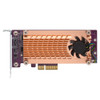
QNAP QM2-2S-220A Dual M.2 SATA SSD PCIe Expansion Card
Overview
The QM2-2S-220A is a PCIe Gen2 expansion card that adds two M.2 SATA SSD slots to a compatible QNAP NAS, PC, or workstation. If your NAS chassis lacks native M.2 slots but has an open PCIe lane, this card closes that gap — enabling SSD caching to accelerate spinning-disk volumes, a dedicated caching pool, or an auto-tiering volume that moves hot data to flash automatically. Both slots accept either 22110 or 2280 form-factor M.2 SATA drives, giving you flexibility to populate with whatever SATA SSDs are in your procurement pipeline without buying a specific form factor.
Compatibility
Designed for the QNAP QM2 series ecosystem and compatible QNAP NAS units with an available PCIe Gen2 slot. Also installable in standard PCIe-equipped PCs and workstations where M.2 SATA expansion is needed. Verify your NAS model against QNAP's official compatibility list before ordering — not all QNAP chassis expose PCIe slots, and PCIe lane count affects whether Gen2 x1 or x2 allocation is available. Note that this card uses the SATA protocol over M.2 — it does not support NVMe (PCIe-protocol) drives. Installing an NVMe SSD in this card will result in the drive not being recognized.
Installation Notes
The card ships in a low-profile bracket configuration suitable for slim chassis and rack-mounted NAS enclosures with low-profile PCIe slots. Confirm your chassis clearance before installing in a standard full-height slot — a full-height bracket may be required separately depending on your enclosure. Seat the card firmly in the PCIe Gen2 slot and secure the bracket before inserting M.2 drives to avoid flexing the board during drive installation.