HP Inc 87C16UT#ABA Z2 Mini G9 Compact Workstation
Overview
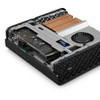
The HP Z2 Mini G9 (87C16UT#ABA) is a small-form-factor workstation built around the Intel Core i7-13700 and a discrete NVIDIA T1000 4GB GPU — a pairing that handles real-time video decode and GPU-accelerated analytics simultaneously without occupying a rack unit or a tower footprint. At roughly the size of a thick book, it fits on a shelf, behind a monitor, or inside a server closet where a full tower has no business being. This is the right machine when you need genuine workstation-class graphics in a space-constrained dispatch or monitoring room.
The 87C16UT#ABA ships with a 3/3/3 warranty (3-year parts, 3-year labor, 3-year on-site), which matters in 24/7 security operations where a workstation failure is a coverage gap, not just a productivity issue.
Key Features
- Intel Core i7-13700 Processor: The 13th-gen i7-13700 brings 16 cores (8P+8E) to bear on simultaneous VMS decode, AI inference, and operator workflow — multi-stream 4K decoding that would saturate an older quad-core box runs without thermal throttling here.
- NVIDIA T1000 4GB GPU: The T1000 is a professional-class card with ECC memory support and certified drivers for commercial VMS platforms. 4GB of dedicated VRAM handles GPU-accelerated decoding across dozens of HD streams, offloading the CPU for analytics and UI responsiveness.
- 16GB RAM: Sufficient headroom for a single-operator VMS client with 20-40 active streams. Upgrading to 32GB is advisable for multi-monitor dispatch stations running concurrent applications.
- 512GB NVMe SSD: The OS and VMS application load from fast NVMe storage, keeping application startup and database queries snappy. This drive is not intended as video storage — pair it with a NAS or network recorder for retention.
- Mini Form Factor (19.70 x 6.80 x 11.60 in): Dimensions that allow desk-side or wall-bracket deployment. The compact chassis reduces cable clutter in control rooms where every inch of rack or desk space is contested.
- 10.95 lb Weight: Light enough to VESA-mount behind a display or secure under a desk with a standard bracket, keeping the operator surface clear.
- 3/3/3 Warranty Coverage: Three-year on-site service means a technician comes to the installation — you are not shipping a mission-critical workstation to a depot during an active investigation or incident.
Integration & Compatibility
The NVIDIA T1000 carries certified driver support for major video management system platforms, including Milestone XProtect, Genetec Security Center, and Avigilon Control Center. GPU-accelerated decode is supported in all three when configured correctly in the VMS client settings. Pair this workstation with a dedicated network video recorder for storage — the 512GB internal SSD is for the OS and application stack, not video retention. For deployments running HP Inc workstations across multiple operator stations, the consistent hardware profile simplifies driver management and image deployment. Review your PoE switch and camera count against GPU VRAM when planning stream counts above 40 simultaneous HD feeds.
Frequently Asked Questions
Q: What does the 3/3/3 warranty on the 87C16UT#ABA cover?
A: The 3/3/3 designation covers 3 years of parts, 3 years of labor, and 3 years of on-site service. A technician dispatches to your location — you do not ship the unit.
Q: Is the 512GB SSD sufficient for VMS video storage?
A: No. The internal SSD is sized for the operating system and VMS application. Video retention should be handled by a dedicated NVR or NAS on the network.
Q: Which VMS platforms support GPU-accelerated decode with the NVIDIA T1000?
A: Milestone XProtect, Genetec Security Center, and Avigilon Control Center all support GPU-accelerated decode. Enable it in the VMS client display settings and verify driver currency against the VMS vendor's certified driver list.
Q: Can the 87C16UT#ABA be wall- or VESA-mounted?
A: The Z2 Mini G9 supports VESA mounting via an optional bracket, allowing behind-monitor or wall deployment. Verify bracket compatibility with HP's accessory catalog for this chassis generation.
Q: Is 16GB RAM enough for a multi-stream surveillance workstation?
A: 16GB is adequate for a single-operator station running 20-40 HD streams in a VMS client. For dispatch stations with multiple monitors, concurrent applications, or 4K stream counts above 20, budget for a 32GB configuration.
The 87C16UT#ABA is the machine I spec when a customer needs a real GPU — not integrated graphics — in a footprint that fits behind a monitor. The NVIDIA T1000's 4GB of ECC VRAM is the differentiator: it is a professional-class card with stable, certified drivers, not a gaming GPU that VMS vendors don't test against.
Technical Highlights:
- i7-13700 (16-core): 8 performance cores handle the heavy decode and analytics load; 8 efficiency cores manage background OS and VMS database tasks without competing for the same thermal envelope.
- NVIDIA T1000 4GB ECC: Professional driver certification matters in VMS environments — consumer GPUs introduce driver instability that shows up as display corruption or VMS client crashes under sustained multi-stream load.
- 3/3/3 On-Site Warranty: In a 24/7 control room, on-site service is the only acceptable failure mode. Depot repair on a monitoring workstation means a coverage gap that most security programs cannot tolerate.
Deployment Considerations:
- Plan storage externally from day one — the 512GB NVMe is consumed quickly by the OS, VMS application, and local database; treat it as application-only and route all video to an NVR or NAS.
- At 16GB RAM, this unit is sized for single-operator use; if the deployment calls for dual-monitor 4K with 40+ streams and concurrent forensic search, validate RAM headroom before finalizing the BOM.
The Z2 Mini G9 is the right pick for new or refreshed single-operator surveillance stations in space-constrained control rooms, retail back offices, and campus security desks where a tower workstation is impractical but integrated graphics are insufficient for the camera count.