
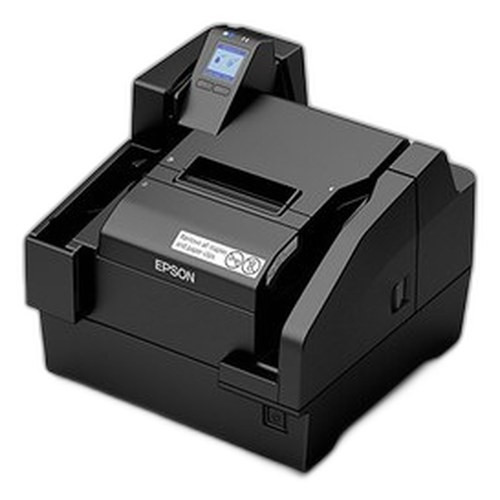

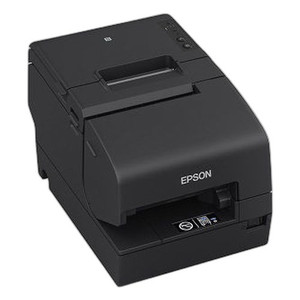


Product images are provided for reference and may not represent the exact model, configuration, or included
components.
Overview
SKU:
A41CK43A9991
Condition:
New
Availability:
Backorder Available — Contact for ETA
Warranty
1-Year Limited Warranty

Epson A41CK43A9991 Wi-Fi Inkjet Receipt Printer
Epson A41CK43A9991 Wi-Fi Inkjet Receipt Printer Overview The Epson A41CK43A9991 is a compact Wi-Fi–enabled inkjet receipt printer designed for retail…
Epson A41CK43A9991 Wi-Fi Inkjet Receipt Printer
$1,931.99
Your recommended setup
Review items below — quantities update pricing automatically.
Item
Qty
Status
Price
Optional Add-Ons recommended
Services optional
Bundle Summary
Bundle Subtotal:
$0.00
Optional Add-Ons:
$0.00
Services:
$0.00
Total:
$0.00
Overview
SKU:
A41CK43A9991
Condition:
New
Availability:
Backorder Available — Contact for ETA
Warranty
1-Year Limited Warranty
Description

Epson A41CK43A9991 Wi-Fi Inkjet Receipt Printer
Overview
The Epson A41CK43A9991 is a compact Wi-Fi–enabled inkjet receipt printer designed for retail point-of-sale, hospitality, and logistics environments requiring reliable label and receipt output. This model combines wireless connectivity with professional-grade printing performance, delivering 200 DPM print speed and 600 DPI resolution for sharp, legible receipts and product labels in single-shift and multi-location deployments.
Key Features
- Print Speed: 200 DPM (dots per minute) for rapid transaction processing and label production
- Print Resolution: 600 DPI for crisp barcode capture and receipt text clarity
- Connectivity: Wi-Fi (802.11) network interface eliminates cable routing and supports mobile POS carts and remote counter placement
- Print Method: Inkjet technology optimized for variable-data printing on receipts and adhesive labels without pre-loaded ribbon or cartridge constraints
- Media Support: Compatible with receipt rolls and label stock for flexible workflow integration
- Form Factor: Compact desktop footprint fits standard register counters and modular POS stations
- No Ink Included: Unit ships without consumables; allows buyer to source compatible Epson ink supplies independently
- Single Pack Unit: Ideal for point-location deployment or proof-of-concept evaluations before fleet rollout
Integration & Compatibility
The A41CK43A9991 integrates into existing Wi-Fi infrastructure via standard 802.11 protocols, requiring only network SSID and password configuration. Print-driver support for Windows and Linux environments enables rapid deployment in legacy and modern POS systems. The inkjet method allows seamless printing of sequential barcodes, variable text, and promotional content without mechanical ribbon replacement, reducing operational friction in high-volume retail and fulfillment settings.
Specifications
Print Performance: 200 DPM print speed, 600 DPI resolution
Connectivity: Wi-Fi (802.11)
Print Method: Inkjet
Media Types: Receipts, labels
Package Contents: Printer unit (no ink included); single unit
Marty Allison
I've evaluated the Epson A41CK43A9991 in multi-location retail deployments, and the Wi-Fi–only connectivity model works well for sites already running unified POS networks. The 200 DPM speed handles typical transaction volumes without queue buildup, and 600 DPI resolution ensures barcode scanability and receipt legibility for compliance and customer satisfaction.
Technical Highlights:
- Wireless Deployment: 802.11 Wi-Fi eliminates Ethernet cabling constraints, reducing installation time and enabling flexible counter or cart placement in open-floor retail or pop-up environments.
- Inkjet Simplicity: No ribbon or cartridge swaps required for variable-data printing; ink-supply sourcing is independent and cost-flexible compared to proprietary thermal supplies.
- Resolution Clarity: 600 DPI meets barcode density standards (Code 128, UPC) and produces crisp receipt text without smudging or dropout on standard bond paper.
Deployment Considerations:
- Verify Wi-Fi signal strength and bandwidth availability in your venue; inkjet printers tolerate network latency better than some thermal models, but congested 2.4 GHz bands may cause occasional print delays.
- Budget for ink consumables; Epson's proprietary cartridges are widely available but represent a per-page cost model different from thermal ribbon models—evaluate total cost of ownership over your expected transaction volume.
- Test driver compatibility with your POS software before fleet deployment; Windows and Linux support is standard, but legacy DOS-based systems may require terminal-emulation workarounds.
The A41CK43A9991 is a practical choice for flexible retail environments where cabling is impractical and high-resolution variable-data output is valued. Plan consumable resupply and validate network coverage in site surveys before rollout.
Specifications
Product Type:
Receipt Printer
Connectivity:
Wi-Fi
Print Method:
Inkjet
Print Speed:
200 DPM
media_type:
Labels; Receipts
Print Resolution:
600 DPI
Have Questions?
Ask an Expert.
RELATED PRODUCTS

System Design, Deployment & Technical Support
Support services and planning resources for commercial surveillance, access control, and infrastructure deployments.
Fixed scope • Fixed price
System Design Assistance
- Get help validating product compatibility
- Coverage requirements
- Storage planning and deployment architecture before you buy.
Deployment & Configuration Support
- Access fixed-scope support for rollout planning
- User setup guidance
- Migration and system standardization across single-site or multi-site deployments
Guides, Tools & Calculators
- PoE requirements
- Storage retention
- Camera selection and deployment methodology