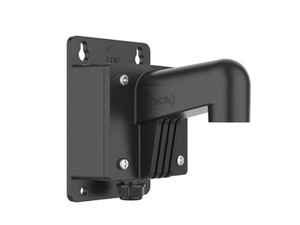
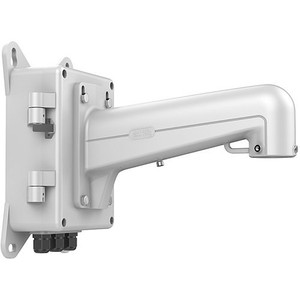
Hikvision WML Wall Mount with Junction Box – Long
The Hikvision WML is a professional wall-mounted junction box solution engineered for surveillance camera installations on flat wall surfaces. Unlike standalone mounts that force you to manage cabling separately, the WML integrates a junction box directly into the housing — eliminating visible conduit runs and simplifying field terminations. This combination reduces installation time and produces a cleaner visual footprint, particularly valuable when mounting cameras in high-traffic areas or locations where aesthetics matter alongside security.
Key Features
- Integrated Junction Box: Cable routing and terminations happen inside the mount itself, eliminating the need for separate surface-mounted boxes. Real benefit: fewer drill holes, single installation point, and organized conductor management from day one.
- 110 lbs Maximum Weight Capacity: Supports most standard turret, dome, and bullet camera platforms, plus moderate multi-camera rigs. Verify your combined camera + bracket weight doesn't exceed this limit — overshooting it voids the structural integrity of the installation.
- Aluminum Alloy Construction: Corrosion-resistant material resists salt spray and UV degradation. Unlike steel mounts, aluminum won't rust even if paint scratches during handling or outdoor exposure. Lower overall weight than steel alternatives, reducing stress on wall anchors.
- Waterproof Design: IP-rated sealing keeps moisture out of the junction box interior. Critical in humid environments, coastal deployments, and anywhere rain or condensation could compromise terminal connections. Does not mean submersible — this is weather-resistant, not flood-proof.
- Universal Pendant Cap Compatibility: Accepts a range of Hikvision and third-party pendant caps, allowing you to pair the WML with various camera mounting heads. Verify cap thread and connector type before ordering if mixing brands.
- White Finish: Discrete appearance suitable for institutional, commercial, and office environments. Blends into most modern building façades without standing out visually. Paint is factory-applied; touch-up paint is not included — plan accordingly if the mount takes impact damage on-site.
Installation Requirements & Considerations
Wall substrate must support a minimum of three times the combined weight of the camera and mount assembly — this is non-negotiable load safety. A 15 lb camera on a 5 lb mount requires a wall capable of safely holding 60 lbs. Concrete, masonry, and solid wood framing all qualify; drywall alone does not. Use expansion anchors or lag bolts rated for your wall material. Flat surfaces only — do not attempt to mount on angled or curved surfaces.
The integrated junction box accepts standard RJ-45, power terminals, and video connectors. Verify that your camera cable types fit the box entry points before installation. The WML ships without pre-drilled holes — you'll need to mark and drill anchor points based on your wall layout and camera position. A mounting template or installation drawing is essential; confirm availability before site deployment.
Typical Deployments
Well-suited for perimeter surveillance, facility access points, parking structures, and general commercial camera mounting where integrated cable management and durable construction reduce long-term maintenance. Also effective in educational and institutional environments where visible cable runs conflict with building standards or aesthetic requirements. Not recommended for ultra-high-vibration industrial settings or for heavy multi-sensor arrays exceeding the 110 lb capacity.
Frequently Asked Questions
Q: Does the WML include mounting hardware and anchors?
A: The WML includes the bracket and junction box assembly only. You must source wall anchors, lag bolts, or expansion fasteners appropriate to your wall substrate. Concrete anchors differ significantly from drywall fasteners, so choose based on your installation surface.
Q: Can I use the WML indoors and outdoors?
A: Yes. The waterproof design and aluminum alloy construction support both indoor and outdoor deployments. In outdoor environments, ensure proper drainage around the base of the mount and verify that your camera's power supply is also rated for outdoor use.
Q: What pendant caps are compatible with the WML?
A: The WML accepts universal pendant caps common to most Hikvision camera lines and many third-party manufacturers. Verify the cap thread size and connector layout before purchase. Consult the camera documentation or contact the manufacturer if you're uncertain about compatibility.
Q: Is the WML suitable for ceiling mounting?
A: No. The WML is designed exclusively for flat wall surfaces. Ceiling-mounted cameras require a dedicated ceiling mount or pendant housing. Attempting to invert the WML for ceiling use will compromise cable routing and structural support.
Q: What tools do I need to install the WML?
A: A drill with bits matched to your anchor type, a level, a tape measure, and basic hand tools (wrench, screwdriver) are typically sufficient. For concrete or masonry walls, a rotary hammer may be necessary for anchor holes. Always check local electrical and building codes before beginning installation.
Q: How do I route cables through the integrated junction box?
A: Entry points vary depending on the junction box design. Standard practice involves feeding RJ-45 (Ethernet), power, and video cables through sealed entries at the base or sides of the box, then terminating them on internal terminal blocks or connectors. Consult the detailed installation guide in the product datasheet.
Ted PerryPerspective based on aggregated IP Security Depot and affiliated engineering team experience.
The Hikvision WML solves a real pain point in camera deployments: cable management at the mount. Too many field installations leave visible conduit and loose terminations around the base of the bracket — it looks unprofessional and creates maintenance headaches. The WML's integrated junction box moves that complexity inside, where it belongs. The 110 lbs weight capacity is honest and non-negotiable — don't stretch it.
Technical Highlights:
- Aluminum Alloy + Waterproof Housing: Resists corrosion and weather, eliminating the rust-and-paint-failure cycle common with steel mounts. Real advantage in salt spray zones or humid climates where a cheaper steel bracket becomes a liability within 18–24 months.
- Integrated Junction Box: Reduces installation points from two (separate mount + separate junction box) to one. Fewer drill holes mean less structural damage to the wall, faster commissioning, and lower risk of misconfigured terminations.
- Universal Pendant Cap Compatibility: Flexibility to swap camera heads without replacing the mount assembly — valuable in retrofit or mixed-vendor deployments where your next camera may not be the same brand.
Deployment Considerations:
- Wall substrate verification is not optional. A 60 lb safety margin sounds conservative, but it accounts for vibration, thermal expansion, and load shift over time. Undersizing the anchor is a liability waiting to happen.
- The WML ships as a bare bracket assembly — no fasteners, no template. You need a proper installation plan and correct anchors before sending a technician to site. A failed install means a second visit, wasted labor, and potential damage claims.
Deploy the WML on institutional and commercial projects where clean aesthetics matter and wall substrate is verified solid. Pair it with a Hikvision turret or dome camera for a complete, professional-looking perimeter solution. Skip it if you're building out an industrial site with vibration or if your wall can't support 60 lbs distributed load — a different accessory category exists for those use cases.