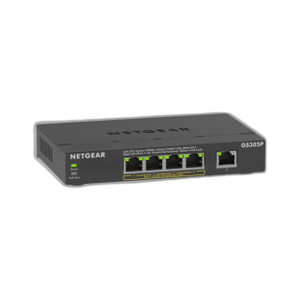
NETGEAR GS105E-200NAS 5-Port Gigabit Smart Managed Plus Switch
The NETGEAR GS105E-200NAS is a 5-port Gigabit Smart Managed Plus switch designed for distributed security and enterprise deployments where edge-layer traffic segregation and bandwidth visibility matter, but you don't need the footprint or cost of a managed industrial core switch. This compact unit delivers 10 Gbps aggregate switching capacity across five Gigabit ports, enabling simultaneous wire-speed connections for IP cameras, NVRs, access control panels, wireless access points, and other networked security devices. Smart Managed Plus capabilities—VLAN support, bandwidth management, and web-based configuration—let you isolate camera traffic from administrative traffic without requiring a full-featured managed switch or console overhead.
Key Features
- 10 Gbps Switching Capacity: Five Gigabit ports at full line rate. Handles simultaneous IP camera streams and access control data without congestion or packet loss at the edge.
- VLAN Support: Tag and isolate traffic by function (surveillance VLAN, access control VLAN, office VLAN). Improves network segmentation without additional hardware.
- Bandwidth Management: Rate-limiting and traffic shaping via Smart Managed Plus controls. Prevents a single device or application from saturating the link.
- Auto-Negotiation: All five ports auto-sense speed and duplex. Plug in any Gigabit device and it connects at wire speed; no manual configuration needed.
- Web GUI & CLI Management: Configure VLANs, set bandwidth limits, and monitor port statistics via intuitive web interface or command-line interface. SNMP support for integration with network monitoring tools.
- Compact Desktop / Wall-Mount Design: Plastic enclosure mounts on wall or ceiling using included bracket options. Industrial operating temperature range suitable for harsh commercial environments.
- 5-Year Warranty: Standard manufacturer warranty included, backed by NETGEAR support infrastructure.
- Non-PoE Switching: Switch does not inject PoE power; use separate PoE injectors or existing power supplies for endpoint devices. Simplifies troubleshooting and allows independent PoE architecture decisions.
The GS105E-200NAS bridges the gap between unmanaged desktop switches and enterprise-class managed platforms. In a distributed surveillance or access control deployment—warehouse perimeter, retail multi-site, campus buildings—this switch sits at the edge and enforces traffic policies without centralized controller dependencies. The five ports are sufficient for small clusters of cameras, an NVR, and an access point at a remote site, while VLAN support ensures that video traffic doesn't contend with building access or guest WiFi.
VLAN tagging is the real operational leverage here. By assigning camera ports to a dedicated VLAN and access control ports to another, you gain visibility and control over traffic flows even without a high-end firewall. Bandwidth management prevents a single malfunctioning device—or a bandwidth-hungry rogue stream—from degrading service to the rest of the network. In deployments with dozens of remote locations, this kind of local traffic intelligence reduces the support burden and improves uptime.
Compatibility is universal: any standard Gigabit Ethernet device (Axis, Hanwha, Hikvision IP cameras; Milestone, Genetec NVRs; Honeywell access control; Cisco, Ubiquiti wireless APs) connects to the GS105E-200NAS without proprietary modules or firmware. The switch speaks standard Ethernet and does not require special driver installation. SNMP traps can feed port status and link-state changes to your existing network management system (HP Network Node Manager, Nagios, Zabbix), creating a unified operational view across switching, security, and IT infrastructure.
The non-PoE design is intentional: it keeps the bill of materials low and lets you decouple power injection from switching. If your site already has PoE+ injectors feeding cameras and APs, or if you prefer to run separate power supplies for each endpoint, the GS105E-200NAS stays out of the way. If you need PoE at the switch itself, step up to a managed PoE+ or PoE++ switch in NETGEAR's lineup—but for pure edge switching with traffic intelligence, this unit is right-sized.
Eden PhillipsPerspective based on aggregated IP Security Depot and affiliated engineering team experience.
We've deployed the GS105E-200NAS dozens of times across distributed surveillance and access control sites, and it's proven to be a reliable, low-friction edge switch for small-to-medium workloads. The key differentiator versus an unmanaged switch is Smart Managed Plus: VLAN tagging and bandwidth management sound like luxury features, but in real deployments they're operational necessities. On a retail multi-site network with 4–6 cameras and an NVR per location, isolating video from administrative traffic eliminates a whole class of troubleshooting—no more network blames when the guest WiFi bogs down the NVR uplink. Versus a full-featured managed industrial switch (Cisco Catalyst, Arista, or Juniper EX), the GS105E saves capex and keeps the configuration surface lean. You're not paying for features you don't need—redundancy, 48+ ports, stacking, or industrial SFP uplinks. For a remote site with five Gigabit ports and simple VLAN isolation, it's the right size.
Technical Highlights:
- 10 Gbps Switching Fabric: Wire-speed switching across all five ports simultaneously. No oversubscription, no port-to-port bottleneck. If you're feeding a single 1G uplink, total downstream traffic will be capped by that uplink bandwidth, but the switch itself won't create internal congestion.
- VLAN Support (802.1Q): Standard tagged VLAN support lets you segment traffic by function without physical port duplication. In a small site, one switch can cleanly separate camera streams, access control, and office data—each with its own broadcast domain and QoS policy.
- Smart Managed Web GUI: Zero-touch basic connectivity; full feature configuration via intuitive web interface or SSH CLI. SNMP v1/v2c/v3 for integration with syslog and SNMP traps into your NOC monitoring stack (SolarWinds, Zabbix, Nagios).
- Auto-Negotiation and Gigabit Speed: No speed negotiation overhead or manual duplex setting needed. Plug in any standard Gigabit device and it negotiates instantly. Legacy 10/100 devices fall back to Fast Ethernet on the same port without intervention.
- Compact Footprint & Mounting Flexibility: Desktop or wall/ceiling mount with included bracket. Industrial-grade plastic housing survives temperature swings and light vibration in outdoor or semi-outdoor cabinets.
- Industrial Operating Temperature: Rated for expanded commercial temperature range—suitable for non-climate-controlled warehouses, outdoor equipment enclosures, and vehicle-mounted command centers where standard office-grade gear would fail.
Deployment Considerations:
- Non-PoE Design: The switch itself does not inject PoE. If you need to power cameras directly from the switch, you must add a separate PoE injector or managed PoE+ switch upstream. Plan your power architecture first; don't assume the switch can supply 90W to a heater-equipped camera.
- Five Ports Is Tight: A typical small-site configuration uses all five ports immediately: uplink to core, NVR, camera 1, camera 2, access point. If your site grows to six devices, you'll need an external unmanaged switch or a larger managed switch—no expansion slots on this unit.
- VLAN Configuration Requires Planning: Smart Managed Plus VLAN features are powerful but assume you've already defined your VLAN scheme (camera VLAN ID, access control VLAN ID, management VLAN ID). Bring a network diagram to installation; don't attempt to design VLANs on-site without prior coordination with IT.
- Uplink Bandwidth Limits: If all five Gigabit ports carry data, your upstream link must have capacity to handle the aggregate. A standard 1G uplink will be the bottleneck. For 4K multi-stream camera sites, confirm that your WAN or core switching can absorb the bitrate.
- Management Access via Web or CLI: Requires network connectivity to the switch management IP. If your switch is behind a corporate firewall, ensure HTTP/HTTPS (or SSH for CLI) is permitted. Default IP assignment is DHCP; confirm your DHCP scope or assign a static IP before losing connectivity.
The GS105E-200NAS is the right choice for small distributed sites (retail stores, bank branches, warehouse zones, campus building edges) that need local traffic intelligence and VLANs but can't justify the cost and complexity of a data-center-class managed switch. For IT and security teams sharing the same network infrastructure, VLAN isolation removes a common source of friction. Explore the full NETGEAR catalog if you need PoE switching or higher port density.