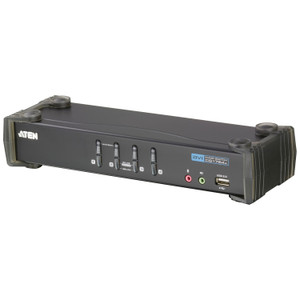
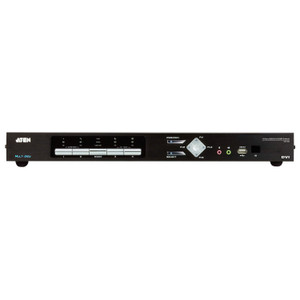
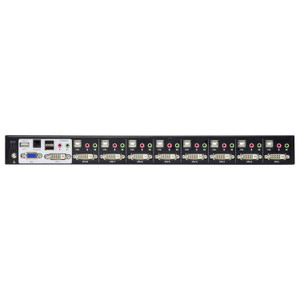
ATEN CS1782A 2-Port USB DVI Dual Link KVMP Switch
Overview
The ATEN CS1782A is a 2-port USB KVM switch built for workstation environments where a single monitor and peripheral set needs to drive two computers — without resolution compromise. Supporting DVI Dual Link at up to 2560 x 1600 @ 60Hz, the CS1782A handles high-end displays that single-link DVI simply cannot feed. That puts it in a different category than commodity KVM switches, which typically cap at 1920 x 1080 or 1920 x 1200. If you're running a 30-inch or larger DVI display alongside two workstations, this is the unit to evaluate.
Beyond video switching, the CS1782A includes integrated USB hub functionality — two USB Type-A female ports (one on the front panel, one on the rear) — making it a true KVMP (KVM plus peripheral) device. Shared USB peripherals like card readers, audio interfaces, or USB drives stay connected through the switch and follow the active computer.
Key Features
- DVI Dual Link at 2560 x 1600 @ 60Hz: Full-resolution output to 30-inch class displays running at their native resolution — no downscaling, no frame rate compromise. Single-link DVI tops out at 1920 x 1200; Dual Link doubles the bandwidth to support the next tier of panel. If your display runs at 2560 x 1600 natively, this matters.
- DVI Single Link fallback at 1920 x 1200 @ 60Hz: Backward-compatible with single-link monitors. You won't need a separate switch if you migrate displays over time — the CS1782A handles both signal types across the same physical connector.
- Three switching methods — Hotkey, Pushbutton, Mouse: Hotkey switching keeps your hands on the keyboard for fast context changes. Pushbutton is reliable for environments where keyboard shortcuts get intercepted by software. Mouse-based switching (moving the cursor to the screen edge) removes hand-off latency entirely for users who prefer pointer control. Having all three means you choose the method that fits the workflow, not the hardware.
- Integrated USB Hub — 2 ports: One USB Type-A port on the front panel (convenient for flash drives or temporary connections), one on the rear panel (for fixed peripherals you don't want dangling). Both follow the active KVM port, so a connected USB device is always accessible from whichever computer is in control.
- Scan interval configurable 1–99 seconds (default 5s): Auto-scan mode cycles through connected computers at your specified interval — useful for monitoring two systems simultaneously without manual switching. The 5-second default is conservative; tighten it for fast-paced monitoring scenarios or loosen it when you need more time to assess each screen.
- Firmware upgradeable (current v1.2.111, released 2025-03-11): The CS1782A is field-updatable via the published firmware package. Running current firmware closes any known compatibility issues. The most recent release is under a year old, indicating active support for the product line.
- Orange LED indicators for active port: Two front-panel LEDs (one per port) show at a glance which computer is selected and which is connected. No guessing in multi-seat or low-light environments.
- USB keyboard and mouse support: Both keyboard and mouse connect via USB — no PS/2 adapters required. Standard for any modern workstation build.
- Operating humidity 0–80% RH, non-condensing: Rated for standard office and light industrial environments. Not suitable for humid server rooms without climate control, but adequate for the overwhelming majority of desktop and bench deployments.
Integration & Compatibility
The CS1782A connects to any computer with a DVI output (Dual Link for full resolution, Single Link for legacy systems) and a USB port for keyboard/mouse control. Both connected computers must have DVI video outputs — DisplayPort or HDMI sources require an active adapter upstream of the switch, which may affect maximum resolution. USB peripheral sharing works with any USB-compatible device; the integrated hub does not require additional drivers on modern operating systems.
Port selection via KVM switching hotkeys follows standard ATEN hotkey conventions. Firmware updates are applied using the published zip package (cs1782a-1784a-v1.2.111.zip) via the upgrade interface — confirm your cable infrastructure and host OS before initiating a firmware update session. For larger installations requiring more ports, consider stepping up within the ATEN KVM line to a 4- or 8-port model in the same family. If your environment uses DisplayPort or HDMI displays instead of DVI, evaluate a different switch from the desktop KVM switches category that matches your video interface. For workstation environments with multiple USB peripherals, pairing the CS1782A with a downstream USB hub expands the two built-in ports without adding another switch. If your setup involves rack-mounted servers, note ATEN's own documentation flags that rack-mount products express dimensions as LxWxH rather than the conventional WxDxH — confirm orientation before ordering rack hardware.
Frequently Asked Questions
Q: What is the maximum resolution supported by the CS1782A?
A: The CS1782A supports DVI Dual Link at 2560 x 1600 @ 60Hz. If connected via DVI Single Link, the maximum drops to 1920 x 1200 @ 60Hz. Resolution achieved depends on the cable type and whether your DVI output is Dual Link capable.
Q: Does the CS1782A work with HDMI or DisplayPort monitors?
A: The CS1782A uses DVI connectors. HDMI and DisplayPort monitors require an active adapter upstream of the switch. Passive adapters may limit maximum resolution — verify adapter specifications before deploying at 2560 x 1600.
Q: How do I switch between computers on the CS1782A?
A: Three methods are available: front-panel pushbutton, configurable hotkey sequences on the keyboard, or mouse-based switching by moving the cursor to the screen edge. All three work simultaneously — you can use whichever method fits the moment.
Q: Can I update the firmware on the CS1782A?
A: Yes. The current firmware is v1.2.111, released 2025-03-11, available as cs1782a-1784a-v1.2.111.zip. The unit supports field firmware upgrades through the published update procedure.
Q: What USB devices can I connect to the CS1782A's built-in hub?
A: The CS1782A has two USB Type-A female ports — one on the front panel and one on the rear. Any USB-compatible peripheral (flash drives, card readers, audio interfaces) can be connected. Both ports follow the active KVM port and do not require additional drivers on modern operating systems.
Q: How long is the scan interval for auto-scan mode?
A: The scan interval is configurable from 1 to 99 seconds, with a default of 5 seconds. You can set it shorter for rapid monitoring or longer if you need more time to review each connected system.
The CS1782A earns its place in high-resolution dual-workstation setups specifically because of its DVI Dual Link support at 2560 x 1600 @ 60Hz — a spec that eliminates the resolution ceiling that kills most 2-port KVM options the moment you put a 30-inch display in the mix. If you're running two engineering workstations or two operator stations sharing a single large-format DVI display, this is the unit I'd reach for first.
Technical Highlights:
- DVI Dual Link bandwidth: 2560 x 1600 @ 60Hz is achievable only over Dual Link DVI — 8.16 Gbps vs the 3.96 Gbps ceiling of Single Link. The CS1782A passes full Dual Link bandwidth to the display without downscaling, which matters when every pixel of a large-format panel is in use.
- Triple switching modes: Hotkey, pushbutton, and mouse-edge switching aren't redundant — they serve different workflow contexts. Hotkey is fastest for keyboard-heavy operators; pushbutton is failsafe when hotkeys conflict with software; mouse switching is the least disruptive for pointer-driven work. Having all three on a 2-port device at this price tier is practical, not a checkbox feature.
- Configurable auto-scan (1–99s): At 1-second minimum, the CS1782A can cycle fast enough to function as a basic dual-system monitor in passive surveillance or IT operations contexts — not a replacement for proper monitoring software, but useful during maintenance windows.
Deployment Considerations:
- Dual Link DVI requires Dual Link DVI cables and Dual Link-capable outputs on both connected computers. Standard single-link DVI cables will cap you at 1920 x 1200 regardless of the switch's rated maximum — verify your cable infrastructure before commissioning.
- The operating humidity ceiling is 80% RH non-condensing. This rules out humid server closets or uncontrolled environments without climate management. It's a desktop and controlled-room device, not rated for harsh environments.
The CS1782A fits best in two-seat engineering or design workstations sharing a high-resolution DVI display — broadcast edit suites, CAD stations, or security operations desks where two operators share one large monitor. It is not the right pick if your display chain has moved to DisplayPort or HDMI, or if you need more than 2 ports.