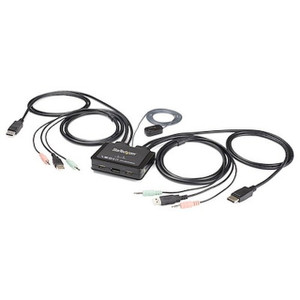
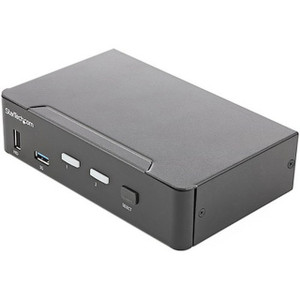
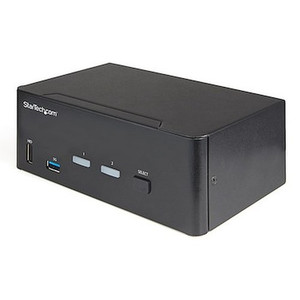
Product images are provided for reference and may not represent the exact model, configuration, or included components.

No Bots, Just Experts

Questions about this product? Free pre-sales support from a senior specialist — product questions, compatibility checks, BOM quotes, price confirmation — typically answered within one business day. Need camera placement or system design work? Engineering time is $175 per hour (qty 1 = 1 hour). Hardware buyers get up to one hour ($175) credited back on their order.

Description

StarTech SV211HDUA4K 2-Port HDMI KVM Switch with Built-in Cables

Overview

The StarTech SV211HDUA4K is a 2-port HDMI KVM switch designed to consolidate control of two separate computers onto a single workstation. This unit simplifies your setup by integrating HDMI video, USB 2.0 keyboard/mouse, and 3.5mm audio connections directly into its built-in cables, eliminating the need for separate adapters and reducing cable clutter. It supports dual UHD resolutions up to 3840 x 2160 at 60Hz, ensuring crisp visuals for demanding applications like video editing, graphic design, or surveillance monitoring. The SV211HDUA4K is ideal for environments where space is limited or where seamless switching between two distinct systems is required, such as IT support desks, control rooms, or workstations handling multiple projects.

Compatibility

This KVM switch is compatible with any computer featuring an HDMI video output and USB 2.0 ports. It supports standard USB 2.0 keyboards and mice, as well as USB 2.0 peripheral devices that draw power up to 480Mbps. The HDMI video interface ensures compatibility with a wide range of monitors and displays supporting resolutions up to 4K @ 60Hz. It also supports 3-position 3.5mm mini-jack audio connections for speakers and microphones, allowing for full multimedia integration.

Installation Notes

The SV211HDUA4K is bus-powered, drawing power directly from the connected computers via USB 2.0, eliminating the need for an external power adapter. This simplifies installation and reduces power outlet requirements. The unit offers multiple port selection methods: a physical push-button on the KVM itself, keyboard hotkeys, or through the included software utility. Operating temperature range is 0 to 40C, with storage temperatures from -20 to 60C. Non-condensing humidity up to 90% RH is supported.

What's in the Box

  • 1x 2-Port HDMI KVM Switch with Built-in Cables
  • 1x User Manual
Specifications
KVM Ports: 2
PC Video Type: HDMI
Number of Monitors: 1
Maximum Digital Resolution: 3840 x 2160 @ 60hz
Maximum Data Transfer Rate: 480Mbps (USB 2.0)
Operating Temperature: 0 ~ 40C
Storage Temperature: -20 ~ 60C
Humidity: 0 ~ 90% RH, Non-Condensing
Product Length: 52.0 in [132.0 cm]
Product Width: 3.8 in [9.7 cm]
Product Height: 1.0 in [2.5 cm]
Weight of Product: 15.2 oz [431 g]
Warranty: 2 Years
Port Selection Support: Push Button, Hotkeys, and Software
Input Voltage: 5V DC
Console Interface USB: 2 - USB 2.0 Type-A (4 pin, 480Mbps)
Console Interface HDMI: 1 - HDMI
Console Interface Audio: 2 - 3.5 mm Mini-Jack (3 Position)
Host Connectors USB: 2 - USB 2.0 Type-A (4 pin, 480Mbps)
Host Connectors HDMI: 2 - HDMI
Host Connectors Audio: 4 - 3.5 mm Mini-Jack (3 Position)
Power Source: Bus Powered
Brand: StarTech
MPN: SV211HDUA4K
Type: Power Supply
Type: Power Supply
Connectivity: USB
Q&A
Reviews
Have Questions?

StarTech 2 Port HDMI KVM Switch W/ Built-in Cables - SV211HDUA4K

$132.21
$131.99

RELATED PRODUCTS

System Design, Deployment & Technical Support

Support services and planning resources for commercial surveillance, access control, and infrastructure deployments.

Fixed scope • Fixed price

System Design Assistance

  • Get help validating product compatibility
  • Coverage requirements
  • Storage planning and deployment architecture before you buy.
Request Design Help

Deployment & Configuration Support

  • Access fixed-scope support for rollout planning
  • User setup guidance
  • Migration and system standardization across single-site or multi-site deployments
View Support Services

Guides, Tools & Calculators

  • PoE requirements
  • Storage retention
  • Camera selection and deployment methodology
Open Technical Resources