
Workstations & Terminals
Showing Results for Workstations & Terminals
-

PioneerPOS
SKU: 46-555-D28
PioneerPOS Audio board for StealthTouch with Atom - 46-555-D28
- Dedicated audio processing offloads CPU load on transaction-critical Atom terminals.
- Direct motherboard connector eliminates external USB audio devices and cabling clutter.
- Field-replaceable module restores or adds audio without full terminal swap.
$45.91 $31.99 Save $13.92 -

PioneerPOS
SKU: 49-ARM-600505
PioneerPOS AX Series Articulating ARM w/ VESA - 49-ARM-600505
- Multi-axis articulation adjusts height, angle, and depth without fixed rail systems.
- VESA-compatible mount supports displays, monitors, and camera heads across common patterns.
- Wall/structural base bracket enables minimal surface penetration for flexible deployment.
$316.99 -

PioneerPOS
SKU: 49-BCRU-R
PioneerPOS Barcode Slot Reader 15 Inch and 17 - 49-BCRU-R
- USB connectivity ensures plug-and-play integration with existing POS and access control systems.
- Left-side bracket mount supports clean cable routing in 15-inch and 17-inch Stealth enclosures.
- Factory-new unit ships with full US warranty coverage for enterprise deployment confidence.
$118.99 -

PioneerPOS
SKU: 46-BRU000
PioneerPOS Barcode Swipe Gray USB Right Side for the - 46-BRU000
- Right-side USB mount fits 15" and 17" Stealth and TOM terminals without brackets.
- Plug-and-play HID interface requires no external drivers or additional power supply.
- Gray factory finish matches PioneerPOS terminal bezels for clean, uniform deployments.
$217.75 $145.99 Save $71.76 -
PioneerPOS
SKU: 46W-BRUF02
PioneerPOS Barcode Swiper and Bio Reader (White) - 46W-BRUF02
- Combines barcode scanning and biometric auth in one peripheral, reducing POS cable clutter.
- Plug-and-play with 15" and 17" Caris Touch terminals—no driver config or firmware patches needed.
- Low-current 46W draw runs off standard USB or terminal power headers; no auxiliary supply required.
$427.09 $286.99 Save $140.10 -

PioneerPOS
SKU: 4GB-B15L
PioneerPOS Base Cyprus M2 Blk (included foam + box) - 4GB-B15L
- OEM molded foam insert locks the Cyprus M2 unit in place, eliminating transit shift.
- Black corrugated exterior resists crushing under stacked loads during warehouse storage.
- M2-specific cavity geometry meets factory shipping specs for repeatable field deployments.
$120.84 $119.99 Save $0.85 -
PioneerPOS
SKU: T3-UPB101
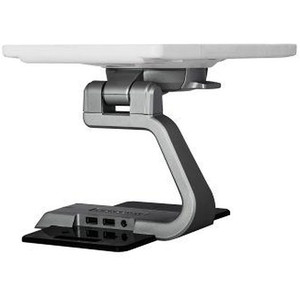
PioneerPOS Base Dash T3 Tall Swivel Tilt Flip 2 USB - T3-UPB101
- 360° swivel plus tilt/flip articulation optimizes display angle for staff and customers.
- Dual integrated USB ports eliminate external hubs at checkout or service stations.
- Engineered exclusively for the Dash T3 form factor; verify model before ordering.
$322.63 $221.99 Save $100.64 -
PioneerPOS
SKU: 4C-M21-B21
PioneerPOS Base For The 21.5 Inch Stealth Silver - 4C-M21-B21
- Engineered exclusively for the PioneerPOS 21.5-inch Stealth Silver display — no adapters needed.
- Fixed desktop orientation keeps display sightline stable across shifts on counters and operator desks.
- Silver finish matches Stealth Silver enclosure for a clean, consistent look in control room deployments.
$132.91 $91.99 Save $40.92 -
PioneerPOS
SKU: 46B-TOM-B15
PioneerPOS Base For TOM-M5 Black - Not to be Used - 46B-TOM-B15
- OEM replacement base ensures correct physical alignment for TOM-M5 terminals.
- Black finish integrates seamlessly with standard TOM-M5 countertop deployments.
- Factory-new condition provides full manufacturer warranty and component traceability.
$72.50 $49.99 Save $22.51 -

PioneerPOS
SKU: 46B-X5-C15
PioneerPOS Base stand X5 with STII/CT15/CT18 Mount - 46B-X5-C15
- Supports STII, CT15, and CT18 mount interfaces for flexible terminal deployment.
- Stable base secures POS terminals on desktops or counters for fixed-workstation installs.
- Includes protective box foam, simplifying staging, transport, and site delivery.
$72.50 $71.99 Save $0.51 -
PioneerPOS
SKU: 46B-M5-B15
PioneerPOS Base Tall For 15 inch-17 Inch Stealth - 46B-M5-B15
- Tall base for 15-17 inch Stealth/Caristouch POS terminals
- Elevated stand reduces operator neck strain
- Black finish for retail and hospitality environments
$120.84 $81.99 Save $38.85 -
PioneerPOS
SKU: 2HB-BAT02-KIT
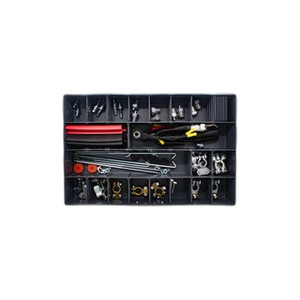
PioneerPOS Battery box kit pre-installed with - 2HB-BAT02-KIT
- PCB and latch arrive pre-installed, cutting bench assembly time during deployment.
- Adds battery backup capability to compatible PioneerPOS terminals without rewiring.
- Black finish aligns with PioneerPOS enclosure aesthetics for clean rack integration.
$48.33 $47.99 Save $0.34 -

PioneerPOS
SKU: 2HG-BAT02-KIT
PioneerPOS Battery box kit pre-installed with - 2HG-BAT02-KIT
- Pre-installed PCB and latch eliminate internal assembly for faster field deployment.
- Drop-in battery module form factor integrates directly into compatible POS terminals.
- Gray powder-coated enclosure provides durable finish suited to retail install environments.
$41.67 $40.99 Save $0.68 -
PioneerPOS
SKU: 46B-D21F01
PioneerPOS BIO/MSR1-2 COMBO PS2 Connector - 46B-D21F01
- Consolidates biometric and MSR data streams into one PS/2 interface, reducing cable runs.
- Standard 6-pin mini-DIN connection requires no external power; terminal supplies via PS/2 line.
- Compatible with PioneerPOS BIO/MSR1-2 COMBO systems; verify PS/2 support on your terminal model.
$435.00 $298.99 Save $136.01 -
PioneerPOS
SKU: 49B-MX-PMT01
PioneerPOS Bracket Kit for PAX-A80 use on MX22 - 49B-MX-PMT01
- Bracket kit for PAX-A80 payment terminal on MX22 stand
- Fixed mechanical adapter for terminal-to-stand integration
- OEM accessory for PAX + MX22 deployment combinations
$97.16 $96.99 Save $0.17 -
PioneerPOS
SKU: 49B-KBP200
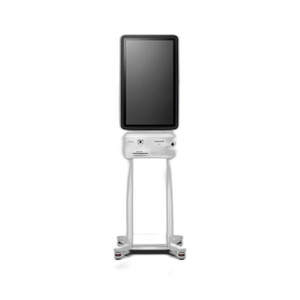
PioneerPOS C1 Kiosk Floor Stand No PRT Support - 49B-KBP200
- Designed exclusively for the PioneerPOS C1 Kiosk platform — verify mounting interface revision.
- No integrated printer support; deploy where receipt or label output is not required.
- Fixed indoor footprint requires no external power or networking at the stand itself.
$1,614.58 $1,069.99 Save $544.59
Workstations & Terminals
Surveillance workstations and terminals provide the computing power required for live monitoring, playback, and video management software (VMS) operation. Designed for control rooms and security desks, these systems ensure smooth performance in high-camera-count environments.
Plan Your Deployment
- Camera count and simultaneous live view requirements
- VMS compatibility and hardware specifications
- GPU and decoding performance needs
- Monitor output configuration and multi-display setup
- Control room ergonomics and operator workflow planning
Workstations & Terminals — Engineering-Grade Video Recording & Storage for Commercial Deployments
This category covers 13 working models of workstations & terminals sourced manufacturer-direct or through channel-direct US distribution. Build the rest of your system around the architectural choices below — compatibility, environmental rating, and lifecycle decisions made here propagate through every downstream component you specify.
What to Look For
Channel count and supported resolution define the recorder's ceiling. A 16-channel NVR rated for 8MP per channel is a different product from a 16-channel rated for 2MP — the latter throttles your future camera upgrades. Read the per-channel and aggregate bitrate ceilings (often expressed in Mbps incoming/outgoing). A safe rule: target an NVR with at least 50% headroom on bitrate, and channel count one step above current need.
Storage architecture matters as much as raw capacity. Surveillance-grade drives (WD Purple, Seagate SkyHawk) are tuned for 24/7 write loads and a small concurrent read count; desktop drives fail in months under the same workload. RAID levels affect both fault tolerance and write performance — RAID 5 for general retention with one drive of redundancy, RAID 6 or 10 for larger arrays where two-drive failure isn't recoverable in RAID 5.
VMS choice locks you into a vendor ecosystem more than any camera decision will. Genetec, Milestone, Hanwha Wisenet WAVE, Avigilon, and Axis Camera Station differ on per-camera licensing cost, third-party integrations (access control, video analytics, identity), and analyst workflow. Demo the operator interface with the people who will actually use it before committing — analyst frustration drives more replacements than technical limits.
Plan for off-site or redundant storage. Single-site recorders fail or get stolen. Cloud-archive licensing, NAS replication, and multi-site federation become important the moment a chain customer asks for centralized investigation tools. Recorders that bury cloud-archive in a per-camera SaaS bundle drive long-term costs much higher than a one-time NAS expansion.
Key Specs in This Category
| Spec | Available Options |
|---|---|
| Resolution | 8MP, Thermal |
| Connectivity | Wired, Cellular |
| Power | AC/DC, PoE++ |
| Channels | 4 |
| Storage | SSD, microSD, HDD |
| Type | NVR, Controller |
Top Brands in This Category
Frequently Asked Questions
How many drives can fit in a typical NVR?
Compact desktop NVRs hold 1-2 drives — typically capping around 16TB usable. Mid-size rack-mount NVRs hold 4-8 drives, often 32-64TB usable in RAID 5/6. Enterprise NVRs and dedicated storage servers scale to 16+ drives with hot-swap and JBOD expansion. Match drive count to your retention math; running out of drive bays mid-project means a recorder replacement, not just a drive add.
Should I use surveillance-grade or enterprise drives?
Surveillance-grade drives (WD Purple, Seagate SkyHawk) are correct for most NVRs — they're tuned for many concurrent write streams from cameras with low read count. Enterprise drives (WD Gold, Seagate IronWolf Pro, Exos) are appropriate for high-channel-count systems with many concurrent investigator clients reading recorded video. Avoid desktop drives entirely; they're rated for 8x5 light duty and fail quickly in 24/7 NVR loads.
What's the difference between an NVR and a hybrid recorder?
An NVR records exclusively from IP cameras over Ethernet. A hybrid (or tribrid) recorder accepts both IP cameras and legacy analog/HD-over-coax cameras on dedicated BNC inputs, useful for migrations where you can't replace coax runs immediately. Hybrid units cost more per channel and add complexity; if you're starting fresh or fully replacing analog, a pure NVR is simpler and almost always cheaper per usable channel.
Can I expand storage on an existing NVR?
Most rack NVRs and storage servers accept storage expansion via empty drive bays, eSATA/SAS JBOD shelves, or iSCSI targets. Desktop NVRs with only 1-2 bays generally do not. Before buying, check the recorder's supported expansion architecture and the maximum raw and usable capacity — many sub-$2,000 NVRs cap below the 24TB threshold most projects need within three years.
Do I need a dedicated VMS workstation?
For a few cameras and one or two simultaneous operators, the NVR's built-in client interface is enough. For 32+ cameras, multiple investigator seats, video walls, or wall-of-monitors operations, a dedicated workstation (or thin client) running the VMS client is standard. The workstation needs adequate GPU decode capacity for the simultaneous stream count — H.265 decode acceleration is essential at scale.
Need help choosing? Talk to a Senior Specialist — direct line 877-277-7147 or request a quote.