
Encoders & Decoders
Showing Results for Encoders & Decoders
-
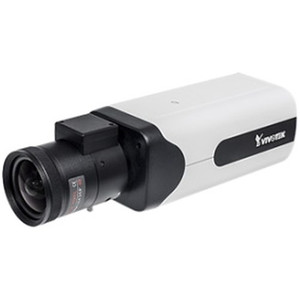
Vivotek
SKU: IE9111-O
Vivotek IE9111-O AI-Powered IP Camera Encoder
IP encoder with 2.1 TOPS AI acceleration for 4K H.264/H.265 video
- Decodes 4K video at 30 fps with H.264/H.265 compression for efficient streaming
- Qualcomm QCS605 NPU runs on-device AI inference for real-time analytics
- IP66-rated, PoE-powered (12W max), operates -25°C to 55°C in outdoor installations
$915.00 $636.99 Save $278.01
Encoders & Decoders
Video encoders and decoders enable flexible video conversion and distribution in commercial surveillance systems. Encoders convert legacy or non-IP video sources into IP streams, while decoders output IP streams to monitors, video walls, and display endpoints.
Plan Your Deployment
- Use case planning (legacy conversion vs stream distribution)
- Channel count and required video formats
- Resolution and bitrate requirements
- Network bandwidth and multicast considerations
- VMS compatibility and integration requirements
Encoders & Decoders — Engineering-Grade Video Recording & Storage for Commercial Deployments
This category covers 47 working models of encoders & decoders sourced manufacturer-direct or through channel-direct US distribution. Build the rest of your system around the architectural choices below — compatibility, environmental rating, and lifecycle decisions made here propagate through every downstream component you specify.
What to Look For
Channel count and supported resolution define the recorder's ceiling. A 16-channel NVR rated for 8MP per channel is a different product from a 16-channel rated for 2MP — the latter throttles your future camera upgrades. Read the per-channel and aggregate bitrate ceilings (often expressed in Mbps incoming/outgoing). A safe rule: target an NVR with at least 50% headroom on bitrate, and channel count one step above current need.
Storage architecture matters as much as raw capacity. Surveillance-grade drives (WD Purple, Seagate SkyHawk) are tuned for 24/7 write loads and a small concurrent read count; desktop drives fail in months under the same workload. RAID levels affect both fault tolerance and write performance — RAID 5 for general retention with one drive of redundancy, RAID 6 or 10 for larger arrays where two-drive failure isn't recoverable in RAID 5.
VMS choice locks you into a vendor ecosystem more than any camera decision will. Genetec, Milestone, Hanwha Wisenet WAVE, Avigilon, and Axis Camera Station differ on per-camera licensing cost, third-party integrations (access control, video analytics, identity), and analyst workflow. Demo the operator interface with the people who will actually use it before committing — analyst frustration drives more replacements than technical limits.
Plan for off-site or redundant storage. Single-site recorders fail or get stolen. Cloud-archive licensing, NAS replication, and multi-site federation become important the moment a chain customer asks for centralized investigation tools. Recorders that bury cloud-archive in a per-camera SaaS bundle drive long-term costs much higher than a one-time NAS expansion.
Key Specs in This Category
| Spec | Available Options |
|---|---|
| Resolution | 5MP, 2MP, 8MP, Thermal, 6MP |
| IP Rating | IP66 |
| Connectivity | Wired, Wi-Fi |
| Power | PoE, AC/DC, PoE++ |
| Storage | microSD |
| Type | Encoder, Video Decoder, Mobile Computer, Software, Monitor, NVR, Power Supply, Dome |
Top Brands in This Category
Frequently Asked Questions
How many drives can fit in a typical NVR?
Compact desktop NVRs hold 1-2 drives — typically capping around 16TB usable. Mid-size rack-mount NVRs hold 4-8 drives, often 32-64TB usable in RAID 5/6. Enterprise NVRs and dedicated storage servers scale to 16+ drives with hot-swap and JBOD expansion. Match drive count to your retention math; running out of drive bays mid-project means a recorder replacement, not just a drive add.
Should I use surveillance-grade or enterprise drives?
Surveillance-grade drives (WD Purple, Seagate SkyHawk) are correct for most NVRs — they're tuned for many concurrent write streams from cameras with low read count. Enterprise drives (WD Gold, Seagate IronWolf Pro, Exos) are appropriate for high-channel-count systems with many concurrent investigator clients reading recorded video. Avoid desktop drives entirely; they're rated for 8x5 light duty and fail quickly in 24/7 NVR loads.
What's the difference between an NVR and a hybrid recorder?
An NVR records exclusively from IP cameras over Ethernet. A hybrid (or tribrid) recorder accepts both IP cameras and legacy analog/HD-over-coax cameras on dedicated BNC inputs, useful for migrations where you can't replace coax runs immediately. Hybrid units cost more per channel and add complexity; if you're starting fresh or fully replacing analog, a pure NVR is simpler and almost always cheaper per usable channel.
Can I expand storage on an existing NVR?
Most rack NVRs and storage servers accept storage expansion via empty drive bays, eSATA/SAS JBOD shelves, or iSCSI targets. Desktop NVRs with only 1-2 bays generally do not. Before buying, check the recorder's supported expansion architecture and the maximum raw and usable capacity — many sub-$2,000 NVRs cap below the 24TB threshold most projects need within three years.
Do I need a dedicated VMS workstation?
For a few cameras and one or two simultaneous operators, the NVR's built-in client interface is enough. For 32+ cameras, multiple investigator seats, video walls, or wall-of-monitors operations, a dedicated workstation (or thin client) running the VMS client is standard. The workstation needs adequate GPU decode capacity for the simultaneous stream count — H.265 decode acceleration is essential at scale.
Need help choosing? Talk to a Senior Specialist — direct line 877-277-7147 or request a quote.