


Overview
SKU:
UP-FLOODLIGHT
Condition:
New
Availability:
Usually ships in 24 hours
Warranty
Manufacturer Warranty
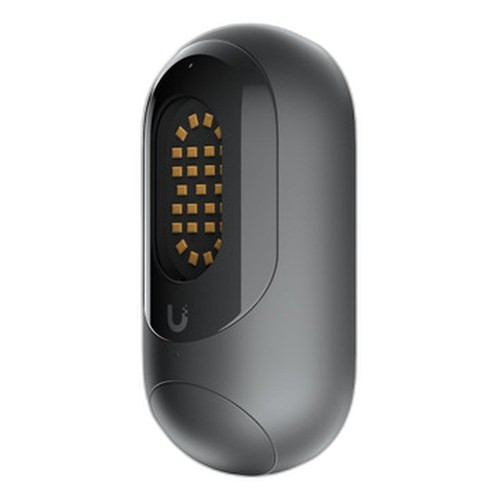
Ubiquiti UP-FLOODLIGHT Protect Floodlight
Ubiquiti UP-FLOODLIGHT Protect Wall-Mount LED Floodlight Overview The Ubiquiti UP-FLOODLIGHT (MPN: UP-FLOODLIGHT) is a PoE-powered LED floodlight des…
Ubiquiti UP-FLOODLIGHT Protect Floodlight
$125.99
Your recommended setup
Review items below — quantities update pricing automatically.
Item
Qty
Status
Price
Optional Add-Ons recommended
Services optional
Bundle Summary
Bundle Subtotal:
$0.00
Optional Add-Ons:
$0.00
Services:
$0.00
Total:
$0.00
Overview
SKU:
UP-FLOODLIGHT
Condition:
New
Availability:
Usually ships in 24 hours
Warranty
Manufacturer Warranty
Description

Ubiquiti UP-FLOODLIGHT Protect Wall-Mount LED Floodlight
Overview
The Ubiquiti UP-FLOODLIGHT (MPN: UP-FLOODLIGHT) is a PoE-powered LED floodlight designed for integration into UniFi Protect surveillance ecosystems. This wall-mounted device combines passive illumination with network connectivity, enabling coordinated lighting control across distributed security installations. Built with polycarbonate and aluminum alloy construction, the unit delivers an IPX5 environmental rating suitable for exterior and semi-exposed mounting scenarios. The floodlight operates across a -10 to 45°C temperature range, making it compatible with varied climate deployments.
Key Features
The UP-FLOODLIGHT operates via 48V PoE injection, drawing a maximum of 0.22A at a 12.95W power budget—allowing integration into standard UniFi PoE switch infrastructure without excessive power planning. Network connectivity is provided through a 10/100 Mbps RJ45 Ethernet port, enabling real-time control and status monitoring. Management occurs exclusively through the UniFi Protect web application and mobile apps (iOS/Android), eliminating the need for separate control interfaces. The unit includes one factory reset button for device recovery, while ESD protection rated at ±8kV (both air and contact discharge) guards against static damage during installation and operation. The compact form factor measures 135 x 65 x 50 mm and weighs 216 grams without mounting hardware, facilitating retrofit scenarios and space-constrained installations.
Deployment Scenarios
The Ubiquiti UP-FLOODLIGHT serves as a peripheral lighting node within larger UniFi Protect camera and NVR deployments. Typical use cases include perimeter illumination around building entrances, parking areas, and monitored zones where coordinated lighting enhances video clarity during low-light hours. The device integrates with automation rules within UniFi Protect, enabling scenario-based triggers (motion detection, schedule-based, or manual activation). Multi-unit deployments across campuses or multi-building properties benefit from centralized management through a single Protect controller.
Network Integration
Integration with UniFi PoE infrastructure is straightforward: connect the RJ45 port to any UniFi Switch PoE output, and the device automatically discovers and registers within the Protect ecosystem. No additional configuration protocol or separate management VLAN is required. The 10/100 Mbps port is sufficient for this use case, as the device transmits only lightweight status and control packets. The MPN UP-FLOODLIGHT supports standard Ubiquiti device adoption workflows and inherits network segmentation policies defined at the switch or controller level.
Installation Notes
Mount the floodlight using the included polycarbonate angle mount bracket, selecting a location with direct PoE connectivity within cable-run distance to the nearest switch. The IPX5 rating permits wall mounting on exterior surfaces; however, avoid direct water jets or submersion. Verify operating temperature compatibility with the intended environment before deployment. The factory reset button allows on-site recovery if device credentials are lost; press and hold until the LED cycles to factory state. No additional optical or sensor calibration is required post-installation.
Marty Allison, Infrastructure Architect
"The UP-FLOODLIGHT fills a specific role in UniFi Protect deployments where passive illumination is needed but full camera hardware is not warranted. Its PoE power model eliminates separate electrical runs, and the low wattage budget makes it stackable alongside camera clusters on a single switch port group. For integrators, the lack of scripting or ONVIF exposure means it's purely a UI-driven device—useful simplicity if you're building standard UniFi installations, but limiting if you need external automation hooks. The MPN UP-FLOODLIGHT is best positioned as a complement to Protect cameras, not a standalone solution. Its compact size and lightweight aluminum mount make it reliable for retrofit work where wall space is tight."
Specifications
Power Type:
PoE, 48V DC, 0.22A Max.
Form Factor:
Wall-mount LED floodlight
Management:
UniFi Protect web application, UniFi Protect mobile app (iOS/Android)
Power_Budget:
12.95W
Speed:
10/100 Mbps
Dimensions:
135 x 65 x 50 mm
Weight:
Without mount: 216 g (7.6 oz)
Enclosure:
Polycarbonate, aluminum alloy
Mount Material:
Angle Mount: Polycarbonate
IP Rating:
IPX5
Ports:
10/100 MbE RJ45 port
Power Consumption:
12.95W
ESD Protection:
Air: ± 8kV, contact: ± 8kV
Buttons:
(1) Factory reset
Operating Temp:
-10 to 45° C (14 to 113° F)
Certifications:
FCC, IC, CE, Anatel: 08447-22-08356
Have Questions?
Ask an Expert.
RELATED PRODUCTS




System Design, Deployment & Technical Support
Support services and planning resources for commercial surveillance, access control, and infrastructure deployments.
Fixed scope • Fixed price
System Design Assistance
- Get help validating product compatibility
- Coverage requirements
- Storage planning and deployment architecture before you buy.
Deployment & Configuration Support
- Access fixed-scope support for rollout planning
- User setup guidance
- Migration and system standardization across single-site or multi-site deployments
Guides, Tools & Calculators
- PoE requirements
- Storage retention
- Camera selection and deployment methodology