


Overview
SKU:
UA-G3-B
Condition:
New
Availability:
Usually ships in 24 hours
Warranty
Manufacturer Warranty
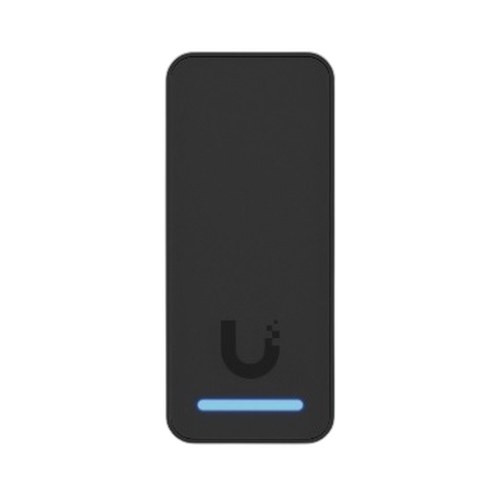
Ubiquiti UA-G3-B 4th gen reader with Apple Touch Pass
Ubiquiti UA-G3-B Access Reader Overview The Ubiquiti UA-G3-B (MPN: UA-G3-B) is a fourth-generation compact access reader designed for enterprise and …

Ubiquiti UA-G3-B 4th gen reader with Apple Touch Pass
$187.99
Your recommended setup
Review items below — quantities update pricing automatically.
Item
Qty
Status
Price
Optional Add-Ons recommended
Services optional
Bundle Summary
Bundle Subtotal:
$0.00
Optional Add-Ons:
$0.00
Services:
$0.00
Total:
$0.00
Overview
SKU:
UA-G3-B
Condition:
New
Availability:
Usually ships in 24 hours
Warranty
Manufacturer Warranty
Description
Ubiquiti UA-G3-B Access Reader
Overview
The Ubiquiti UA-G3-B (MPN: UA-G3-B) is a fourth-generation compact access reader designed for enterprise and mid-market deployments requiring seamless credential authentication. This UniFi Access Reader integrates directly with the UniFi Network Controller, enabling centralized management across distributed access points. The device supports Apple Touch Pass, allowing mobile credential provisioning without additional hardware investment. Weighing just 0.200 lb, the UA-G3-B's compact form factor suits both new installations and retrofits in existing door frames and entry structures.
Key Features
The UA-G3-B leverages Ubiquiti's UniFi Access ecosystem, which consolidates physical security credentials under a single management platform. Native Apple Touch Pass support eliminates card-reader dependencies for organizations standardizing on Apple devices. The reader's compact design accommodates standard door frame installations without structural modification. Management through the UniFi Network Controller provides role-based access control, audit logging, and real-time status monitoring from a unified console. The device manufactured in CN and engineered for enterprise-grade reliability.
Deployment Scenarios
The UA-G3-B is suited for office buildings, multi-tenant facilities, and campus environments where credential diversity is required. Organizations adopting Apple device ecosystems benefit from Touch Pass integration, reducing friction for employee access. The reader performs effectively in both primary access points and secondary zones, providing consistent authentication standards. Integrators deploying UniFi Access can mix readers across facility locations while maintaining unified policy enforcement and audit trails.
Network Integration
The UA-G3-B connects to UniFi Network Controller infrastructure, requiring network connectivity to the controller and optional local failover support. Integration with existing UniFi deployments is straightforward, as the reader shares the same management interface and credential database. The device communicates securely with the controller, encrypted credentials transmission and real-time synchronization across reader networks.
Installation Notes
Standard door frame mounting accommodates the compact form factor without special reinforcement. Network connectivity via Ethernet establishes communication with the UniFi Network Controller. Initial provisioning occurs through the UniFi interface, where administrators assign access policies and credential types. The lightweight design (0.200 lb) simplifies installation on existing door infrastructure. Integrators should verify controller reachability and network latency before field deployment of the UA-G3-B.
Expert Commentary — Ted Perry, Systems Integration Director:
"The UA-G3-B reader streamlines credential management for organizations already invested in UniFi infrastructure. Apple Touch Pass support is a practical advantage where workforce devices are standardized on iOS. The compact footprint and straightforward controller integration make the UA-G3-B a sensible choice for phased access system rollouts. In our deployments, the reader's consistent authentication performance and audit logging have simplified compliance reporting."
Specifications
Form Factor:
Compact Access Reader
Management:
UniFi Network Controller
Product Family:
Ubiquiti Access Readers
Country of Origin:
CN
Weight:
0.200 lb
Have Questions?
Ask an Expert.
RELATED PRODUCTS


System Design, Deployment & Technical Support
Support services and planning resources for commercial surveillance, access control, and infrastructure deployments.
Fixed scope • Fixed price
System Design Assistance
- Get help validating product compatibility
- Coverage requirements
- Storage planning and deployment architecture before you buy.
Deployment & Configuration Support
- Access fixed-scope support for rollout planning
- User setup guidance
- Migration and system standardization across single-site or multi-site deployments
Guides, Tools & Calculators
- PoE requirements
- Storage retention
- Camera selection and deployment methodology