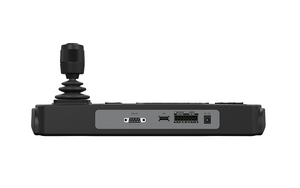
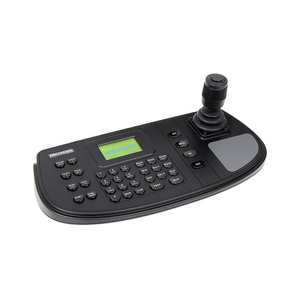
Hikvision DS-1005KI USB Surveillance Keyboard
The Hikvision DS-1005KI is a wired USB controller purpose-built for operators who need tactile, real-time command over PTZ cameras and networked security systems. Unlike software-only interfaces, the DS-1005KI puts physical control at your fingertips—pan, tilt, zoom, and focus adjustments happen immediately through dedicated hardware, reducing operator fatigue and reaction time in high-stakes monitoring environments.
Key Features
- 4-Axis Joystick Control: Smooth, precision pan-tilt-zoom-focus adjustment means operators can track subjects fluidly without hunting through menus. The rotating zoom knob isolates zoom commands from pan/tilt, reducing accidental overshoots on fast-moving targets.
- USB 2.0 Connectivity with DirectX Support: Plug-and-play integration with standard DirectX drivers eliminates complex configuration. Works with Hikvision DVRs, NVRs, and third-party ONVIF-compliant devices, so you're not locked into a single ecosystem.
- Compact Ergonomic Form Factor: Dimensions of 167 × 116 × 177.5 mm (6.57" × 4.57" × 6.99") fit easily into control room consoles or mobile command stations without monopolizing desk space. Lightweight and cable-managed, it stays put during shift changes.
- 5V DC USB Power: Draws power directly from the USB connection—no separate power supply, no wall adapter, no additional cable runs to clutter your installation. Current draw stays low enough that bus power from a standard USB 2.0 hub is sufficient.
- Dedicated Control Layout: Physical buttons for zoom, iris, focus, and camera selection eliminate the need to remember keyboard shortcuts. Operators switch between cameras and adjust lens parameters without taking their hands off the joystick.
- Wide Operating Range: Functions reliably from -10°C to 55°C (-14°F to 131°F) and tolerates 10–90% humidity (non-condensing). Suitable for control rooms with variable HVAC performance or unheated security stations in temperate climates. Not rated for outdoor mounting or high-moisture environments.
Integration & Compatibility
The DS-1005KI integrates with the Hikvision surveillance line via standard USB and works with any PTZ camera or NVR that supports DirectX input protocols. If your control room already runs a network video recorder with USB ports on the back panel, you can connect the DS-1005KI directly without additional drivers on most Windows systems. Multi-camera deployments benefit from the dedicated camera selection buttons—operators can lock focus on one camera while queuing up pan-tilt commands for another without switching device focus.
Deployment Context
This controller shines in staffed monitoring stations—retail loss prevention, transportation hubs, critical infrastructure, and enterprise security operations where operators spend shifts managing multiple PTZ cameras. It reduces training time compared to keyboard-and-mouse control and cuts operator error on time-sensitive pan-tilt sequences. Unsuitable for unattended deployments or remote access scenarios where keyboard input arrives over a network; in those cases, a software control panel works better.
When to Choose a Different Model
If your installation is keyboard-only or operator preference runs toward software controls, standard USB keyboards with onscreen joystick emulation may suffice. If you need IP-based remote control over WAN links, consider NVR software interfaces instead. For very high-volume camera switching or synchronized multi-camera tracking, evaluate higher-end control consoles with programmable macros.
Frequently Asked Questions
Q: Is the DS-1005KI compatible with third-party cameras or just Hikvision?
A: It works with any PTZ camera or NVR that accepts DirectX input via USB. Hikvision products are fully supported, but compatibility depends on the control software installed on your NVR or VMS. Check that your system's control panel exposes USB joystick input before purchasing.
Q: Can I use the DS-1005KI over a network, or only via direct USB connection?
A: Direct USB connection only. It is not a networked device. For remote PTZ control over LAN or WAN, use the camera's or NVR's built-in software control interface instead.
Q: What is the cable length, and can I use a USB extension cable?
A: The evidence does not specify cable length. Standard USB 2.0 extension cables (up to 5 meters total) generally work, but test with your specific control room layout before final installation to avoid power degradation or signal dropout.
Q: Does the DS-1005KI require software installation or drivers?
A: Windows typically recognizes it as a standard DirectX joystick with built-in drivers. No additional installation is needed in most cases. Linux and macOS support depends on your control software's USB HID compatibility.
Q: Is the DS-1005KI suitable for outdoor control stations?
A: No. Operating range is -10°C to 55°C in 10–90% non-condensing humidity. For outdoor shelters or unheated cabinets subject to condensation, this controller will fail. Keep it indoors in a climate-controlled environment.
Q: What happens if I connect two DS-1005KI units to the same NVR?
A: The evidence does not specify multi-unit behavior. Test with your NVR before deploying two controllers to the same system; control software may treat them as a single input source or allow operator switching between them.
Ted PerryPerspective based on aggregated IP Security Depot and affiliated engineering team experience.
I've deployed the Hikvision DS-1005KI in three control rooms—retail, traffic management, and a data center with exterior PTZ coverage. The difference between this hardware controller and mouse-based joystick emulation is immediate: operators track faster, hand fatigue disappears after 8-hour shifts, and camera switching is tactile enough that new staff onboard in hours instead of days. The 4-axis joystick with isolated zoom knob is the key; it lets you pan-tilt while zooming without the cursor jumping.
Technical Highlights:
- USB 2.0 DirectX Input: Plug-and-play with zero driver complexity on Windows. Bus-powered (5V DC directly from USB), so you're not running additional 12V lines to a control console. Works immediately on Hikvision NVRs and any third-party system that accepts standard HID joystick input.
- Compact 167 × 116 × 177.5 mm footprint: Small enough to slide into a cramped control room rack or a mobile command station without sacrificing control responsiveness. Weight and form factor mean installation time is under 15 minutes—unpack, plug in, start using.
- Operating range -10°C to 55°C with 10–90% humidity tolerance: Indoor-only rating. Control rooms with unreliable HVAC or unheated security stations will see condensation issues below 5°C. Plan for climate control, not just power.
Deployment Considerations:
- Direct USB connection only—no networking. If you need remote PTZ control from a remote operations center, this won't work. Use NVR software interfaces or IP-based PTZ keyboards instead. The DS-1005KI is a staffed control room device, full stop.
- Watch the USB power budget. Standard USB 2.0 bus power is adequate (5V DC), but daisy-chaining multiple controllers or running them through a long extension cable can cause brownout. Test your cable runs before committing to final layout.
- No programmable macros. Dedicated buttons for zoom, iris, focus, and camera selection are fixed—you can't reprogram them for custom tracking sequences. If your operation needs 10 preset pan-tilt-zoom positions per camera, you'll need NVR software macros running alongside the controller.
Position the DS-1005KI in staffed monitoring stations where operators spend hours managing a small to medium number of PTZ cameras. It cuts training time and improves tracking precision compared to keyboard or mouse emulation. Skip it for remote access, automated surveillance, or unattended systems.