


Overview
SKU:
RC485C
Condition:
New
Availability:
Usually ships in 24 hours
Warranty
3-Year Manufacturer Warranty
Write a Review

Write a Review
Speco Technologies
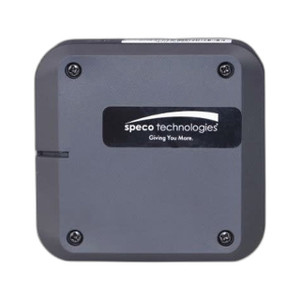
Speco Technologies RC485C Allows remote menu control of HT7246IHR
Speco Technologies RC485C Allows remote menu control of HT7246IHR
Speco Technologies RC485C Remote Menu Control Module Overview The Speco Technologies RC485C is a remote menu control module designed to extend operat…

Speco Technologies RC485C Allows remote menu control of HT7246IHR
$68.99
Your recommended setup
Review items below — quantities update pricing automatically.
Item
Qty
Status
Price
Optional Add-Ons recommended
Services optional
Bundle Summary
Bundle Subtotal:
$0.00
Optional Add-Ons:
$0.00
Services:
$0.00
Total:
$0.00
Overview
SKU:
RC485C
Condition:
New
Availability:
Usually ships in 24 hours
Warranty
3-Year Manufacturer Warranty
Description

Speco Technologies RC485C Remote Menu Control Module
Overview
The Speco Technologies RC485C is a remote menu control module designed to extend operational flexibility in professional surveillance deployments. This accessory enables integrators and system operators to control HT7246IHR camera functions directly from a DVR or RCINT interface, eliminating the need for on-site physical access to camera controls. The RC485C leverages RS-485 serial communication architecture, a proven standard in security systems, to establish reliable two-way communication between the surveillance hub and remote devices.
Built for integration into mid-to-large scale surveillance networks, the RC485C provides system administrators and security integrators with centralized menu navigation and parameter adjustment capabilities. This remote control architecture is particularly valuable in multi-camera deployments where cameras are mounted in difficult-to-access locations—rooftops, exterior walls, or enclosed structures—where manual adjustment would require ladder access, facility disruption, or specialized equipment.
Key Features
- RS-485 Serial Communication: Native integration with Speco DVR systems and RCINT control interfaces via proven industrial serial protocol
- HT7246IHR Compatibility: Engineered specifically to control and configure Speco HT7246IHR camera parameters remotely
- Menu-Level Control: Full access to camera settings, including focus, exposure, white balance, and image quality parameters from a centralized control interface
- DVR Integration: Seamless compatibility with Speco DVR platforms; control initiated directly from the DVR front panel or software interface
- RCINT Interface Support: Functions with standard RCINT remote control hardware, supporting both hardware and software-based control protocols
- Simplified Installation: Drop-in module compatible with existing Speco surveillance architectures; minimal configuration required for deployment
Integration & Compatibility
The RC485C operates within Speco's legacy and current DVR ecosystems. It connects via RS-485 serial ports present on HT7246IHR cameras and compatible DVR units. System integrators should verify DVR firmware version to ensure remote menu control support; most Speco DVR platforms released within the last five years include native RC485C driver support.
Installation requires standard twisted-pair RS-485 cabling terminated to the camera and DVR control ports. The RC485C module itself acts as a command translator, converting DVR menu navigation inputs into RS-485 serial commands interpreted by the HT7246IHR. Multi-camera deployments using daisy-chained RS-485 architecture can control multiple RC485C modules simultaneously, though address configuration should be performed during initial commissioning to prevent command conflicts.
This module is designed for indoor and protected outdoor environments. For exposed or vandal-prone exterior installations, install the camera unit itself in a protective housing or ensure adequate weather protection for RS-485 cable connections at termination points.
Operational Benefits for Integrators
By deploying the RC485C, integrators eliminate repeated service calls for minor camera adjustments. Focus drift, exposure hunting, or white balance corrections can be performed by the facility operator from the DVR control room without requiring technician dispatch. This reduces operational costs and improves system uptime, particularly in geographically distributed facilities or buildings where camera access is restricted.
The remote control capability also enables predictive maintenance workflows: operators can adjust camera settings based on seasonal lighting changes, temporary facility configurations, or temporary obstructions without waiting for scheduled maintenance visits.
Marty Allison
I've specified the RC485C in several multi-site retail and warehouse deployments where camera placement made manual adjustment impractical. The module's reliability in RS-485 serial environments is solid—I've seen zero firmware conflicts when paired with current Speco DVR platforms. The RC485C essentially transforms your DVR into a complete camera management console, which is exactly what you want in a centralized security operation.
Technical Highlights:
- Serial Protocol: RS-485 two-way communication ensures reliable command execution even in electrically noisy industrial environments
- Camera Control Scope: Full menu access to HT7246IHR parameters—focus, iris, gain, white balance, and image enhancement settings
Deployment Considerations:
- Verify your DVR firmware revision supports RC485C commands before ordering; contact Speco technical support with your DVR model and firmware version
- Plan RS-485 cabling runs during initial installation rather than retrofitting; cable routing impacts command latency in longer runs (over 1,000 feet, use buffered repeaters)
- Document address assignments and control mappings in your system commissioning records—this saves troubleshooting time during future maintenance
For integrators managing facilities with inaccessible camera locations or requiring frequent parameter adjustments, the RC485C delivers operational value that justifies its modest cost. I'd recommend it for any Speco deployment using HT7246IHR cameras in multi-camera systems.
Specifications
Warranty:
3-Year Manufacturer Warranty
Have Questions?
Ask an Expert.
RELATED PRODUCTS


System Design, Deployment & Technical Support
Support services and planning resources for commercial surveillance, access control, and infrastructure deployments.
Fixed scope • Fixed price
System Design Assistance
- Get help validating product compatibility
- Coverage requirements
- Storage planning and deployment architecture before you buy.
Deployment & Configuration Support
- Access fixed-scope support for rollout planning
- User setup guidance
- Migration and system standardization across single-site or multi-site deployments
Guides, Tools & Calculators
- PoE requirements
- Storage retention
- Camera selection and deployment methodology