
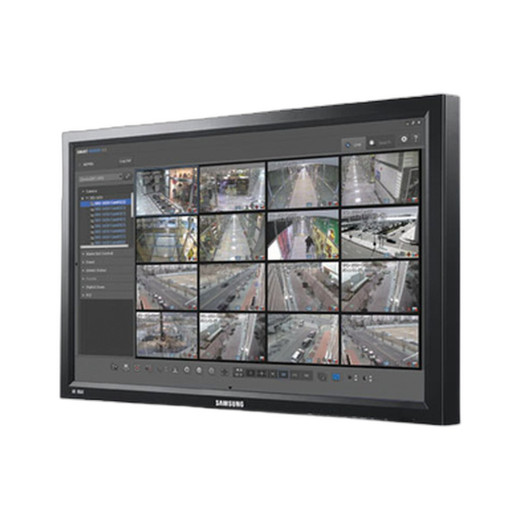



Product images are provided for reference and may not represent the exact model, configuration, or included
components.
Overview
SKU:
SmartViewer-Legacy-Camera-Management-Software
Condition:
New
Availability:
Usually ships in 24 hours

Hanwha SmartViewer Legacy Camera Management Software
Hanwha SmartViewer Legacy Camera Management Software Hanwha SmartViewer Legacy is a comprehensive video management software solution designed for org…
Hanwha SmartViewer Legacy Camera Management Software
$99,999.99
Your recommended setup
Review items below — quantities update pricing automatically.
Item
Qty
Status
Price
Optional Add-Ons recommended
Services optional
Bundle Summary
Bundle Subtotal:
$0.00
Optional Add-Ons:
$0.00
Services:
$0.00
Total:
$0.00
Overview
SKU:
SmartViewer-Legacy-Camera-Management-Software
Condition:
New
Availability:
Usually ships in 24 hours
Description

Hanwha SmartViewer Legacy Camera Management Software
Hanwha SmartViewer Legacy is a comprehensive video management software solution designed for organizations requiring flexible, multi-camera surveillance monitoring and playback. This lightweight platform supports up to 72 channels across dual monitors, making it ideal for small to mid-sized security deployments using Wisenet network cameras, encoders, DVRs, and NVRs.
Key Features
- Multi-channel monitoring: Up to 36 channels standard (72 channels with dual monitor support)
- Flexible display layouts: 1, 4, 9, 16, 25, 36-split modes (16:9 aspect ratio) and 1, 6, 12, 20, 30-split modes (4:3 aspect ratio)
- Automatic sequence mode with up to 16-split screen transitions
- Dual monitor support for expanded viewing capability
- Comprehensive PTZ control: zoom, pan, autopan, group scan, preset positions, iris/focus, and auto-tracking
- Advanced search capabilities: date, event, POS data, heatmap, and DVR/NVR-based search
- Real-time event monitoring with instant video playback on detection
- Intuitive video playback controls: play, pause, step, skip, and variable speed navigation
Event Management & Recording
SmartViewer Legacy supports comprehensive event detection including motion, video loss, sensor triggers, video analytics (passing, entering, exiting, appearance, tampering, tracking), face detection, audio detection, and defocus alerts. Users can configure instant player pop-ups and audio alerts for rapid incident response. Local recording supports up to 2 hours of continuous capture from selected video tiles, with backup options in SEC and AVI formats.
Device & User Management
The software includes automatic device IP scanning, firmware updates, password management, and NAS configuration for networked storage. Admin and user account structures support up to 1 admin and 20 user accounts with granular access permissions. System settings and device configurations can be exported and imported for efficient multi-site deployment.
Technical Specifications
- Supported audio formats: G.711 u-law (PCM), G.723, G.726 (ADPCM), AAC
- Resolution support: Varies by connected device
- Operating systems: Windows 7, 8, 8.1, 10, 11
- Multi-language support: 24 languages including English, Chinese, Japanese, Korean, Russian, and more
- Automatic self-upgrade via Hanwha upgrade server
- Video enhancement tools: brightness/contrast adjustment, deinterlacing, digital zoom, defog, dewarping
- Metadata control and on-screen display customization
System Requirements
Minimum: Intel i3+ CPU, 3GB RAM, 512MB video memory, 200GB HDD, DirectX 9.0+, 1024x768 display resolution. Recommended: Intel i7 (Sandy Bridge)+ CPU, 4GB RAM, 1GB video memory, 200GB+ free HDD space, OpenGL compatibility.
Ted Perry
SmartViewer Legacy represents a capable entry-level VMS solution for organizations with existing Hanwha/Wisenet infrastructure. Its strength lies in straightforward multi-camera management, flexible display configurations, and event-driven automation—all delivered without complex licensing overhead. The 72-channel dual-monitor capacity addresses small commercial deployments effectively.
However, organizations considering new system purchases should evaluate the newer Wisenet Viewer platform, which offers enhanced capabilities and long-term vendor support. SmartViewer Legacy remains valuable for legacy system maintenance, cost-conscious operations, and organizations requiring proven Windows-based management without cloud dependencies.
Specifications
Supported Resolution:
Depending on the device
Supported Format:
G.711 u-law (PCM), G.723, G.726 (ADPCM), AAC
Multi-monitor:
Dual Monitor Support
Split-screen Mode:
(16 : 9) 1, 4, 9, 16, 25, 36 (Full screen) (4 : 3) 1, 6, 12, 20, 30 (Full screen)
Sequence Mode:
Up to 16-splits
PTZ Control:
Area zoom, Zoom, Swing / Autopan, Group / Scan, Trace / Pattern, Preset, Iris / focus control, Home position, Auto tracking
Simple Recording:
Recording of the selected video tile up to 2hours (SEC)
Favorite List:
Favorite view (Save the current split mode setting), Sequence of the favorite list
Functions:
OSD on/off, Snapshot/prints image, Brightness/contrast control, Keep aspect ratio, Deinterlacing, Digital zoom, Defog, Dewarping, Setting device config, Metadata off/ on
Search Mode:
Date, Event, POS, Heatmap, Search based on DVR, NVR, Local folder
Video Control:
Start/stop, Pause, Faster/slower forward/backward, Step forward/backward, Skip forward/backward
Backup:
Local Storage, Backup Format (SEC, AVI)
Real-time event List:
Shows real-time event list of the device (Event status, Type, device, time(PC)), Viewing instant video image
Searching events:
Recording Type : Manual / schedule Event Type : Sensor, Video Loss, Motion, VA (Passing, Entering, Exiting, (Dis)Appear, Tampering, Tracking, Face detection, Audio detection, Defocus)
History:
Support serach log
Instant Player:
Plays the corresponding camera’s video image (DVR / NVR)
event Action:
Sound, Instant player pop-up
User Management:
Admin 1, User 20
Device Management:
Automatic device IP scanning, Viewing the device settings (Device webpage), Exporting / Importing devices settings, Updating the device firmware, Change devices password, Setting NAS
Environment Rating:
OSD display, Date/time, Capture, Recording, Sequence, Receive events, Language
System Settings:
Export / Import SmartViewer settings
Update:
Automatic self upgrade (Using Hanwha upgrade server)
Wisenet N/W camera, Encoder, DVR / NVR:
-
N/W Product:
Up to 36 channels (Dual Monitor, up to 72 channels)
DVR:
Up to 16 devices
Language:
Total 24 languages Support English, French, German, Spanish, Italian, Russian, Chinese, Japanese, Korean, Turkish, Polish, Czech, Serbian, Romanian, Portuguese, Dutch, Croatian, Hungarian, Greek, Taiwanese, Swedish, Danish, Finnish, Norwegian
Recommended:
CPU Intel i7 (Sandy bridge) above RAM 4 GB above, Video Memory 1GB above, HDD more than 200GB of free space for installation, DirectX 9.0 above. Display Resolution : 1024 x 768 above, OpenGL compatible
Minimum:
CPU Intel i3 above, RAM 3GB above, Video Memory 512GB above, HDD 200GB above, DirectX 9.0 above. Display Resolution : 1024 x 768 above, OpenGL compatible
Operating System:
Windows 7, Windows 8, Windows 8.1, Windows 10, Windows 11
Product Type:
Software
Have Questions?
Ask an Expert.
RELATED PRODUCTS


System Design, Deployment & Technical Support
Support services and planning resources for commercial surveillance, access control, and infrastructure deployments.
Fixed scope • Fixed price
System Design Assistance
- Get help validating product compatibility
- Coverage requirements
- Storage planning and deployment architecture before you buy.
Deployment & Configuration Support
- Access fixed-scope support for rollout planning
- User setup guidance
- Migration and system standardization across single-site or multi-site deployments
Guides, Tools & Calculators
- PoE requirements
- Storage retention
- Camera selection and deployment methodology