


Product images are provided for reference and may not represent the exact model, configuration, or included
components.
Overview
SKU:
DS-1600KI
UPC:
842571111675
Condition:
New
Availability:
No Longer Available
Warranty
5-year warranty
Hikvision DS-1600KI 10.1" Touchscreen Network Keyboard
Hikvision DS-1600KI 10.1" Touchscreen Network Keyboard The Hikvision DS-1600KI is a professional-grade network keyboard controller designed for centr…
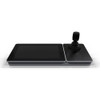
Hikvision DS-1600KI 10.1" Touchscreen Network Keyboard
$2,348.00
$1,349.99
Your recommended setup
Review items below — quantities update pricing automatically.
Item
Qty
Status
Price
Optional Add-Ons recommended
Services optional
Bundle Summary
Bundle Subtotal:
$0.00
Optional Add-Ons:
$0.00
Services:
$0.00
Total:
$0.00
Overview
SKU:
DS-1600KI
UPC:
842571111675
Condition:
New
Availability:
No Longer Available
Warranty
5-year warranty
Description

Hikvision DS-1600KI 10.1" Touchscreen Network Keyboard
The Hikvision DS-1600KI is a professional-grade network keyboard controller designed for centralized management of IP-based surveillance systems. Combining a responsive 10.1" TFT LCD touchscreen with a precision 4-axis joystick, this device delivers intuitive control over PTZ cameras and networked security infrastructure. Built for security professionals who demand reliability and ease of use in complex surveillance environments, the DS-1600KI streamlines multi-camera operations and system configuration from a single control point.
Key Features
- 10.1" TFT LCD Touchscreen with 1280 × 800 resolution for clear, responsive navigation
- 4-Axis Joystick for precise PTZ camera control and smooth pan/tilt/zoom operations
- Dual Network Connectivity: Gigabit Ethernet (10M/100M/1000M) and Wi-Fi support
- Multiple Video Interfaces: HDMI and DVI outputs for flexible display integration
- Comprehensive Serial Support: Network, RS-232, RS-422, and RS-485 for legacy device integration
- Audio I/O: Dual 3.5 mm connectors for audio input and output
- USB 2.0 Ports: Two ports for peripheral connectivity and device management
- Compact, Ergonomic Design: Lightweight at 1.7 kg with professional-grade construction
Technical Specifications
- Display: 10.1" TFT LCD touchscreen, 1280 × 800 resolution
- Joystick: 4-axis for PTZ camera control
- Connectivity: Gigabit Ethernet, Wi-Fi, USB 2.0 (×2), RS-232/422/485 serial interfaces
- Video Support: H.265 and H.264 compression compatibility; HDMI and DVI outputs
- Audio Interfaces: 1-ch input (3.5 mm, 2.0 Vp-p) and 1-ch output (3.5 mm, 600 Ω)
- Power: 12 VDC or PoE, low consumption at ≤15 W
- Operating Conditions: -10 to +55°C; 10–90% humidity
- Dimensions: 404 × 163 × 180 mm; Weight: 1.7 kg
Applications
The DS-1600KI is ideal for security control centers, retail environments, critical infrastructure facilities, and enterprise surveillance deployments. Its combination of touchscreen usability and precision joystick control makes it suited for operators managing multiple PTZ cameras or complex multi-site security systems. The extensive interface options enable seamless integration with existing Hikvision and third-party IP cameras, NVRs, and DVRs.
Eden Phillips
The DS-1600KI represents a mid-to-high tier control solution for IP surveillance. Its dual input method—touchscreen plus 4-axis joystick—addresses operator preference; many professionals prefer joystick precision for PTZ operations while appreciating touchscreen convenience for menu navigation and system configuration. The 10.1" display strikes a balance between visibility and desk footprint, suitable for control room installations where space is at a premium.
Support for both legacy serial protocols (RS-232/422/485) and modern Ethernet/Wi-Fi connectivity ensures compatibility across mixed-generation security deployments. PoE powering eliminates the need for separate DC supply in many network-centric installations, simplifying cabling. Low power consumption (≤15 W) and wide operating temperature range (-10 to +55°C) indicate robust industrial design appropriate for 24/7 security operations.
For organizations standardized on Hikvision equipment, this controller offers deep integration; third-party compatibility varies by device manufacturer.
Product Documentation
Specifications
Dimension (W × H × D:
404 mm × 163 mm × 180 mm (15.91" × 6.42" × 7.09")
Weight:
1.7 kg (3.75 lb)
Power Type:
12 VDC/PoE
Screen:
10.1" TFT LCD touchscreen, Resolution: 1280 × 800
Joystick:
4-axis joystick
Network Interface:
10M/100M/1000M adaptive ethernet port; WiFi: Supported
USB Interface:
2 × USB 2.0
Audio Interface:
Audio Input: 1-ch, 3.5 mm connector (2.0 Vp-p, >1 KΩ);Audio Output: 1-ch, 3.5 mm connector (2.0 Vp-p, 600 Ω)
Video Interface:
HDMI, DVI
Serial Interface:
Network, RS-232, RS-422, RS-485
Power (Max:
≤15 W
Working Temperature:
-10 to +55° C (14 to 131° F)
Working Humidity:
10% to 90%
Product Type:
Controller
Connectivity:
Wired
Display Size:
10.1"
Max Channels:
1
Video Compression:
H.265, H.264
Audio Support:
Yes
Operating System:
Android
Weight Lbs:
3.75
Have Questions?
Ask an Expert.
RELATED PRODUCTS

Hikvision DS-1200KI Professional Network 4-axis Joystick Surveillance Keyboard
$598.00
$341.99
Save $256.01


Hikvision DS-1006KI Precision Joystick Surveillance Keyboard
$370.00
$211.99
Save $158.01
System Design, Deployment & Technical Support
Support services and planning resources for commercial surveillance, access control, and infrastructure deployments.
Fixed scope • Fixed price
System Design Assistance
- Get help validating product compatibility
- Coverage requirements
- Storage planning and deployment architecture before you buy.
Deployment & Configuration Support
- Access fixed-scope support for rollout planning
- User setup guidance
- Migration and system standardization across single-site or multi-site deployments
Guides, Tools & Calculators
- PoE requirements
- Storage retention
- Camera selection and deployment methodology